Recently, the Cyble Research Lab came across a new ransomware group called AvosLocker. We have covered the key features of this new ransomware group in our earlier blog. It is a malicious executable that infects Windows machines to encrypt document files of the victim and asks for ransom as part of its extortion program. Researchers at Cyble have found that the AvosLocker ransomware group has used various sophisticated techniques for developing the ransomware.
In Figure 1, Cyble researchers have shown the complete execution flow of the AvosLocker Ransomware.

Technical Analysis
We started with static analysis and found that the ransomware is a Console based x86 architecture application, developed using C/C++ programming language and compiled recently on “2021-07-06 02:57:44“, as shown in Figure 2.

Upon execution of the ransomware executable, a ransom note is created with the name “GET_YOUR_FILES_BACK.txt” in every directory. The note instructs the victim to visit the “hxxp:xxavos2fuj6olp6x36[.]onion” website for the details related to ransom amount and payment method, as shown in Figure 3.

As shown in Figure 4, Once the ransom notes are created, the ransomware encrypts the user’s document files and appends the “.avos” extension to them.

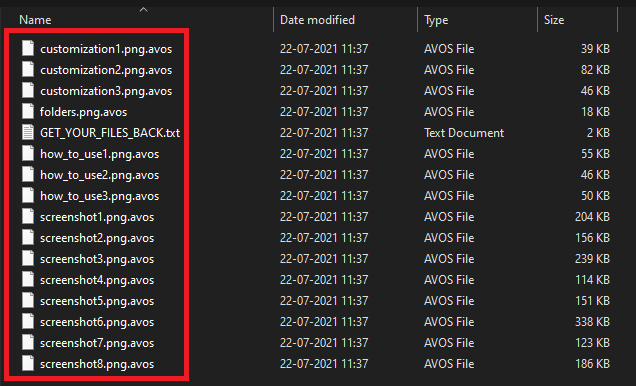
The ransomware also encrypts the network share drive, as shown in Figure 5.

Code Analysis
The Cyble Research Lab began its investigation with code analysis.
Initially, the ransomware creates a mutex with the name “ievah8eVki3Ho4oo” to ensure that only one process is running at a time in the victim OS (Operating System), as shown in Figure 6.

The malware generates a key that can be used to encrypt the document files using the AES-256 Algorithm, as shown in Figure 7.

Once the keys are generated, the Malware tries to enumerate network share using the Application Programming Interface (API’s), which are shown in Table 1 for encrypting it, and the code for listing the network share is shown in Figure 8.
- WNetOpenEnumA
- WNetEnumResourceA
- WNetAddConnection2A
- WNetCloseEnum
Table 1 Windows API’s used for Enumerating the network shares

Further, the Ransomware iterates through all the logical drives and creates the Ransom note name “GET_YOUR_FILES_BACK.txt” in every directory. We can see the same in Figure 9.

Once the Ransom Notes are created, the ransomware search for all the files having extensions is shown in Figure 10.

Once the ransomware finds a file with the defined extension, as shown in Figure 10, it uses the “Restart Manager” technique, shown in Figure 11, to check whether the file that the ransomware is trying to encrypt is being used by any running process. If the file is currently being accessed by another process, the ransomware kills the process and proceeds with the content encryption.

The ransomware reads the file’s content, encrypts it, and writes the content in the encrypted file with a unique signature. This signature is used to identify whether the file is encrypted or not, as shown in Figure 12.

Once the content has been encrypted, the AvosLocker ransomware uses the “MoveFileW” API to append it with the “.avos” extension, as shown in figure 13.

Our research indicated that the ransomware uses the DLL’s listed below for evasion. Instead of relying on just Win32 API’s, the ransomware group has used defined Libraries of VC++ for the development of AvosLocker ransomware.
- Eapi-ms-win-core-datetime-l1-1-1
- api-ms-win-core-file-l1-2-2
- api-ms-win-core-localization-l1-2-1
- api-ms-win-core-localization-obsolete-l1-2-0
- api-ms-win-core-processthreads-l1-1-2
- api-ms-win-core-string-l1-1-0
- api-ms-win-core-sysinfo-l1-2-1
- api-ms-win-core-winrt-l1-1-0
- api-ms-win-core-xstate-l2-1-0
- api-ms-win-security-systemfunctions-l1-1-0
- ext-ms-win-ntuser-dialogbox-l1-1-0
- ext-ms-win-ntuser-windowstation-l1-1-0
- api-ms-win-appmodel-runtime-l1-1-2
Table 2 DLLs used by AvosLocker ransomware
The AvosLocker ransomware group has been actively targeting organizations as well as government institutions since July 2021.
Conclusion
Our research indicates that AvosLocker has been created as a “Console” based application. Over time, the cybercriminals behind ransomware groups adding new code to evolve their Ransomware as a Service (RaaS) service continuously with new Tactics, Techniques, and Procedures (TTPs). We believe that there may be an enhancement in the form of an upcoming variant of the AvosLocker ransomware.
We are continuously monitoring AvosLocker’s extortion campaign and will keep updating our readers with the latest information as and when we find it.
Our Recommendations
We have listed some of the essential cybersecurity best practices that create the first line of control against attackers. We recommend that our readers follow these suggestions given below:
- Use strong passwords and enforce multi-factor authentication wherever possible.
- Turn on the automatic software update feature on your computer, mobile, and other connected devices wherever possible and pragmatic.
- Use a reputed anti-virus and Internet security software package on your connected devices, including PC, laptop, and mobile.
- Refrain from opening untrusted links and email attachments without verifying their authenticity.
- Conduct regular backup practices and keep those backups offline or in a separate network.
MITRE ATT&CK® Techniques
| Tactic | Technique ID | Technique Name |
| Initial access | T1566 | Phishing |
| Execution | T1204 | User Execution |
| Discovery | T1082 | System Information Discovery |
| Impact | T1490 T1489 T1486 | Inhibit System Recovery Service Stop Data Encrypted for Impact |
Indicators of Compromise (IoCs):
| Indicators | Indicator type | Description |
| 43b7a60c0ef8b4af001f45a0c57410b7374b1d75a6811e0dfc86e4d60f503856 | Hash | SHA-256 |
| ievah8eVki3Ho4oo | Mutex | Mutex Name |
Generic signatures and Rules:
Yara Rules:
rule win32_avoslocker

{

        meta:

        author= "Cyble Research"

        date= "2021-07-23"

        description= "Coverage for AvosLocker Ransomware Binary"

        hash= "1cc84c4bf3f08051cc6e16cbfaed9e5fcf7c9178930b29a8e838ea0831759489"

        strings:

                $header= "MZ"

                $sig1 = "ZB7yuwikFFaWosazVfylr5jn0pxSsVnav2wFgri4RbXFhISe0tIAE4damx+6hf2V" wide ascii

                $sig2 = "All data will be leaked if you do" wide ascii

                $sig3 = "encrypting %ls failed" wide ascii

        condition:

                $header at 0 and (2 of ($sig*))

}
About Us
Cyble is a global threat intelligence SaaS provider that helps enterprises protect themselves from cybercrimes and exposure in the Darkweb. Its prime focus is to provide organizations with real-time visibility to their digital risk footprint. Backed by Y Combinator as part of the 2021 winter cohort, Cyble has also been recognized by Forbes as one of the top 20 Best Cybersecurity Start-ups To Watch In 2020. Headquartered in Alpharetta, Georgia, and with offices in Australia, Singapore, and India, Cyble has a global presence. To learn more about Cyble, visit www.cyble.com.