Uncovering the new Java-Based SAW RAT’s Infiltration Strategy via LNK files
Key Takeaways
- Cyble Research and Intelligence Labs (CRIL) came across a ZIP archive file on VirusTotal with minimal detection. Further analysis of this file revealed the presence of a new Java-based Remote Access Trojan (RAT) embedded within the same archive.
- The ZIP archive includes a shortcut (.lnk) file. When executed, it triggers a JavaScript to initiate the execution of a malicious JAR, which is identified as “Saw RAT.”
- Saw RAT comprises multiple functionalities, including the collection of system information, transferring files, listing directories, executing arbitrary commands, and more.
- The Threat Actors (TA) utilizes a socket connection to facilitate communications between the server and client, facilitating various functions such as data exchange, remote control access, and other operations.
- The TAs responsible for this Saw RAT and its targeted victims are currently unknown.
Overview
On November 22nd, CRIL came across a ZIP archive file on VirusTotal. Upon analysis, it was observed that the ZIP file contains a shortcut file (.lnk) with an Adobe icon, initiating the execution of a new Java-based RAT that is concealed within the Java Runtime Environment (JRE) directory, which was included in the same archive.
We named it “Saw RAT” for better tracking purposes due to its utilization of the package name “saw.chain.” This RAT is designed to establish a connection with a remote server, allowing the server to issue various commands to the victim’s system. These commands cover a range of functionalities, including gathering system information, transferring files, listing directories, and executing arbitrary commands on the target system.
The source of the maliciously crafted ZIP archive containing the Adobe icon LNK file is unknown. The lure PDF employed in the infection chain requires a password to open the PDF file, suggesting that the password may be mentioned in the email content. Therefore, we infer that it could potentially infiltrate a user’s system via spam emails.
Technical Details
The zip file includes a folder named “a” and a shortcut file with the name “welfare_inititatives.lnk,” as shown below.

Within the “a” folder, there is an additional subfolder labeled “jre” along with a JavaScript file named “jp.js,” as shown below.

The “jre” folder is a Java Runtime Environment directory that encompasses various legitimate folders and files. Notably, within this directory, there is a deceptive PDF file named “jpackage.pdf” and a malicious JAR file named “jpackage.jar,” as shown below.


Upon execution of the “welfare_inititatives.lnk” file,it triggers the below command-line operation that copies the “files.zip” archive from either the Desktop or Downloads location to the %temp% folder. Subsequently, it proceeds to extract the copied zip file within the %temp% folder and initiates the execution of the JavaScript file “jp.js” located in the path “%temp%\files\a,” as depicted in the figure below.
- C:\Windows\System32\cmd.exe /c copy “%USERPROFILE%\Desktop\files.zip” %temp% & copy “%USERPROFILE%\Downloads\files.zip” %temp% &cd %temp% & tar -xf files.zip & start files\a\jp.js

After the JavaScript file is executed, it obtains the file path of the “jpackage.pdf” and “jpackage.jar” files. After that, it proceeds to open the PDF file and begin the execution of the “jpackage.jar” file using the Shell.Run command as shown in the code snippet below.

The image depicted below shows a prompt requesting a password to open the deceptive PDF file, specifically designed to trick victims into believing they are opening a legitimate PDF document.

The figure below illustrates the process tree of the malware infection that occurs after the successful execution of the “welfare_inititatives.lnk” file.

Saw RAT
The analyzed Saw RAT is a Java Archive file with a size of 14KB. The manifest file, “MANIFEST.MF,” located in the META-INF directory, contains the main class (saw.chain.Main) of the JAR, as shown below.

The main class encompasses the main method, which internally invokes the show() method from the FrameMain class, as shown below.

The show() method creates a new invisible simple JFrame with a specified size and layout, and it starts a new thread to run an instance of the MSocket class, as depicted in the code snippet below.

The line of code (new Thread((Runnable)new MSocket())).start() creates a new thread. It initiates its execution upon invoking the start() method, which internally calls the run() method of the Runnable interface within this new thread.
The run() method in the MSocket class further proceeds to execute the connect() method, initiating a socket connection and subsequent communication with the server identified by the IP address “144[.]91[.]112[.]130” on port “6023,” as shown in the code snippet below.

Initially, it runs the doHeartBeat() method, which creates a timer that periodically sends an “HB” (Heartbeat) message to the server, ensuring the connection remains active. After that, it enters a while loop that monitors incoming messages from the server, carrying out various functions in response to the received commands.
The figure below illustrates the commands received from the server and the corresponding methods to be invoked for each server command.

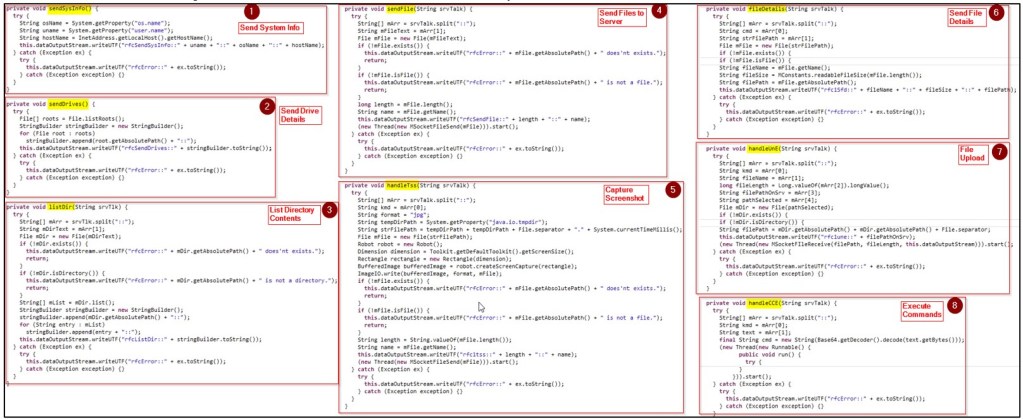
The RAT performs various operations covertly, responding to commands received from the server. These functionalities encompass:
| C&C Commands | Description |
| kfsSendSysInfo | Collects information such as the operating system name, username, and hostname, formats it, and sends it to the server. |
| kfsSendDrives | Retrieves a list of available drives, formats it, and sends it to the server. |
| kfsListDir | Enumerates the contents of a specific directory and sends the list to the server. |
| kfsSendFile | Sends a specific file to the server. |
| kfs1tss | Captures a screenshot of the client’s screen using the Robot class, saves it as a temporary file, and sends it to the server. |
| kfs1Sfd | Retrieves details such as name, size, and path of a specific file and sent to the server. |
| kfs1une | Handles the upload of a file to the server. |
| ffs1cce | Receives a Base64-encoded command, decodes it, executes the command through the cmd.exe, and captures the output. |
The following image illustrates a code snippet containing various methods utilized by the RAT to execute malware operations on the victim’s machine.
Throughout our analysis, the Command and Control (C&C) server was inactive, and as a result, no activities were observed from the attacker’s side.
However, if the data is exfiltrated successfully, TAs could undertake a range of malicious activities aligned with their goals, encompassing financial motives, espionage, disruptive actions, and others.
Conclusion
Trojans pose a substantial risk to both individuals and organizations, posing serious threats to privacy, data security, and the overall integrity of computer systems. RATs employ various methods for propagation. In this case, TAs utilized a maliciously crafted ZIP archive file.
This archive contains a PDF icon shortcut, which, when clicked, executes a JavaScript file, initiating the execution of the new RAT malware, which is embedded within the same ZIP archive. The Saw RAT provides victim’s system control to the TAs, enabling them to execute various functionalities such as extracting system information, transmitting important files, capturing screenshots etc.
CRIL consistently monitors the latest phishing or malware strains in circulation, offering timely blog updates with actionable intelligence to help protect users from these attacks.
Our Recommendations
We have listed some essential cybersecurity best practices that create the first line of control against attackers. We recommend that our readers follow the best practices given below:
- The initial infection occurs via spam emails or deceptive websites. Therefore, it’s advisable to deploy strong email filtering systems for identifying and preventing the dissemination of malicious attachments and to only download and install software applications from reputable and trusted sources.
- Consider disabling or limiting the execution of scripting languages, such as PowerShell or JavaScript, on user workstations and servers if they are not essential for legitimate purposes.
- Deploy strong antivirus and anti-malware solutions to detect and remove malicious executable files.
- Set up network-level monitoring to detect unusual activities or data exfiltration by malware. Block suspicious activities to prevent potential breaches.
- Enhance the system security by creating strong, distinct passwords for each of the accounts and, whenever feasible, activate two-factor authentication.
- Regularly back up data to guarantee the ability to recover it in case of an infection and keep users informed about the most current phishing and social engineering methods employed by cybercriminals.
MITRE ATT&CK® Techniques
| Tactic | Technique | Procedure |
| Execution (TA0002) | Command and Scripting Interpreter: Windows Command Shell (T1059.003) |
cmd.exe is used to run commands such as copy, start, and others. |
| Execution (TA0002) | Command and Scripting Interpreter: JavaScript (T1059.007) |
Uses JavaScript file to open decoy PDF and run the malicious JAR file. |
| Defense Evasion (TA0005) | Data Encoding (T1132.001) |
The malware may receive a command from the server encoded in Base64, which it subsequently decodes for execution. |
| Discovery (TA0007) | System Information Discovery (T1082) |
The malware gathers system information such as OS name, username, etc. |
| Discovery (TA0007) | File and Directory Discovery (T1083) |
Enumerate files and folders to get a list of directories. |
| Collection (TA0009) |
Data from Local System (T1005) |
Tries to gather information from client system. |
| C&C (TA0011) |
Non-Application Layer Protocol (T1071) |
Using sockets for network communication. |
Indicators Of Compromise
| Indicators | Indicator Type |
Description |
| 13c01534896246365dbbb625d8dbcbf4 23a10d0d057dbaa919aaa7b55fc41c64de440fbc 7ae348cfe0954e1f1fa90259519d8fed4da5507ba206e99f704ddbb0634e7e57 |
Md5 Sha1 Sha256 |
files.zip |
| 9acd010a980719f738ce561ccb127384 6817f846408bc55d68ccc6b52b61afd9f4cfaa3e afe98e350b2c37e1213ace09cc18fdb1c654fa6651dbb98b2a5b364db8708b29 |
Md5 Sha1 Sha256 |
welfare_ inititatives.lnk |
| 15957e06aead7d907972842d803f6471 66bb5a01bccaaa85382e32f5accc5a1437abae7a 614741ce1bd8ac8afc25eac95df2e6e4709551d46e6bc26281bf2d1aa44e94d9 |
Md5 Sha1 Sha256 |
jpackage.jar |
| 144[.]91[.]112[.]130: 6023 | IP: Port | C&C |