

Most internet users don’t really care about their DNS server. They just hop in, open a browser, and sort of assume websites will show up, like instantly. But back there, under the hood, every time you ask for a page it usually triggers a DNS lookup first.
So, as organizations start paying more attention to performance, dependability, and cybersecurity, DNS kind of became a key part of today’s internet plumbing. Also, the worldwide DNS services market was estimated at $5.97 billion in 2024, and it’s expected to grow quite a bit over the next ten years.

If your DNS provider feels laggy, then each new website visit can take longer than it should. And if it isn’t properly secured, bad actors can mess with the DNS system, and route you to the wrong destinations , shove malware around, or run phishing campaigns. Choosing a DNS Hijackcarefully can lead to snappier browsing, stronger privacy, and an extra protective layer against everyday online risks.
There isn’t some single DNS server that’s best for everyone, period. Cloudflare (1.1.1.1) is often pitched as the quickest public DNS setup, while Quad9 (9.9.9.9) is generally viewed as very secure, mostly because of its built-in malware blocking. At the same time NextDNS and Mullvad DNS can be great options for people who prioritize privacy, more than just about anything else. In the end, the “right” DNS server depends on what you value most: speed, protection, anonymity, content filtering, or fine-tuning.
Key Takeaways
- Cloudflare (1.1.1.1) is the best overall DNS server for most users, offering an excellent balance of speed, privacy, and reliability.
- Quad9 (9.9.9.9) is the strongest choice for security, automatically blocking known malicious domains using threat intelligence from multiple security partners.
- Google Public DNS (8.8.8.8) remains one of the most reliable public DNS services, with strong global infrastructure and consistent uptime.
- NextDNS offers the highest level of customization, making it ideal for users who want granular control over filtering, analytics, and privacy settings.
- Mullvad DNS is a leading option for privacy-focused users seeking minimal data collection and a no-nonsense approach to DNS security.
- OpenDNS FamilyShield and AdGuard DNS are excellent choices for families looking to block inappropriate content, ads, trackers, and malicious websites.
- Switching from an ISP-provided DNS server to a reputable public DNS provider can improve browsing performance, privacy, and protection against phishing and malware.
- For most users in 2026, Cloudflare, Quad9, and NextDNS represent the strongest combination of speed, security, and privacy.
What Is a DNS Server?
The Domain Name System (DNS) acts as the internet’s directory service. When you type a website address into your browser, DNS translates that domain name into an IP address that computers can understand.
Without DNS, users would need to remember numerical IP addresses for every website they visit.
Every internet connection relies on DNS resolution. This makes DNS one of the most important yet overlooked components of online performance and security. A fast DNS resolver can reduce lookup delays, while a secure DNS provider can help block malicious domains before a connection is established.
The growing importance of DNS is reflected in the rapid expansion of the industry itself. According to market estimates, the global DNS services market was valued at $5.97 billion in 2024 and is projected to reach $27.14 billion by 2033, highlighting the increasing demand for faster, more secure, and highly available DNS infrastructure. Within that broader market, the managed DNS segment was valued at $1.56 billion in 2024 and is expected to grow to $4.14 billion by 2030, as organizations increasingly rely on third-party providers for DNS performance, security, and resilience.
As cyber threats continue to target DNS infrastructure through phishing, malware distribution, and DNS hijacking attacks, choosing the right DNS provider has become an important part of both personal and organizational cybersecurity strategies.
How We Evaluated These DNS Servers
To create this list, we reviewed publicly available benchmark data, provider documentation, privacy policies, DNS security capabilities, and support for modern protocols such as:
- DNS-over-HTTPS (DoH)
- DNS-over-TLS (DoT)
- DNS-over-QUIC (DoQ)
- DNSSEC
- IPv6
We also evaluated providers based on:
- Query response times
- Malware and phishing protection
- Privacy and logging practices
- Global infrastructure coverage
- Ease of setup
- Family-friendly filtering options
- Enterprise readiness
Because DNS performance varies by location and ISP routing, benchmark figures should be treated as approximate averages rather than guaranteed results.
Best DNS Servers 2026: Quick Comparison
| Provider | Average Latency | Best For | DNSSEC | DoH/DoT | IPv6 | Malware Protection |
| Cloudflare | ~11 ms | Speed & Privacy | Yes | Yes | Yes | Optional |
| Google DNS | ~20 ms | Reliability | Yes | Yes | Yes | Limited |
| Quad9 | ~25 ms | Security | Yes | Yes | Yes | Yes |
| OpenDNS | ~30 ms | Families | Yes | Partial | Yes | Yes |
| NextDNS | Varies | Customization | Yes | Yes | Yes | Yes |
| AdGuard DNS | Varies | Ad Blocking | Yes | Yes | Yes | Yes |
| Mullvad DNS | Varies | Privacy | Yes | Yes | Yes | Optional |
| Control D | Varies | Power Users | Yes | Yes | Yes | Yes |
| Comodo Secure DNS | Varies | Malware Protection | Partial | Limited | Limited | Yes |
DNS Server Addresses (IPv4 & IPv6)
| Provider | Primary IPv4 | Secondary IPv4 | IPv6 |
| Cloudflare | 1.1.1.1 | 1.0.0.1 | 2606:4700:4700::1111 |
| Google DNS | 8.8.8.8 | 8.8.4.4 | 2001:4860:4860::8888 |
| Quad9 | 9.9.9.9 | 149.112.112.112 | 2620:fe::fe |
| OpenDNS | 208.67.222.222 | 208.67.220.220 | Available |
| AdGuard DNS | 94.140.14.14 | 94.140.15.15 | 2a10:50c0::ad1:ff |
| NextDNS | Custom | Custom | Custom |
| Mullvad DNS | 194.242.2.2 | N/A | Available |
| Control D | Custom | Custom | Available |
| Comodo Secure DNS | 8.26.56.26 | 8.20.247.20 | Limited |
The Best DNS Servers Reviewed
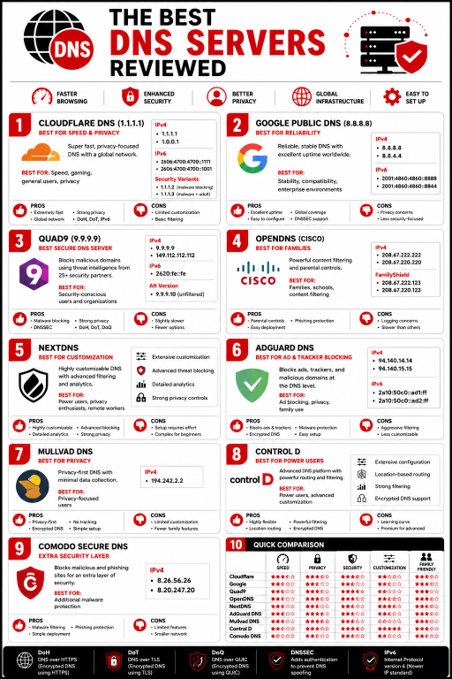
Cloudflare DNS (1.1.1.1) — Best for Speed & Privacy
Cloudflare has become the default recommendation for users looking to replace their ISP’s DNS service. It consistently ranks among the fastest public DNS providers worldwide, with average response times around 11 milliseconds in many benchmark studies.
The company operates DNS infrastructure across more than 300 cities in over 100 countries, helping reduce latency for users around the world.
Cloudflare also places significant emphasis on privacy. The company states that DNS query logs are deleted within 24 hours and its privacy commitments have undergone independent audits.
Best for: Speed, gaming, general users, privacy-conscious users
IPv4
- 1.1.1.1
- 1.0.0.1
IPv6
- 2606:4700:4700::1111
- 2606:4700:4700::1001
Security Variants
- 1.1.1.2 (malware blocking)
- 1.1.1.3 (malware + adult content blocking)
Pros
- Extremely fast response times
- Strong privacy commitments
- Global infrastructure
- Supports DoH, DoT, and IPv6
- Easy setup
Cons
- Limited customization
- Advanced filtering options are basic compared to NextDNS
Google Public DNS (8.8.8.8) — Best for Reliability
Google Public DNS remains one of the most widely used public DNS services in the world. While it is not always the fastest option, it consistently delivers excellent uptime, stability, and compatibility across devices and networks.
Google’s global infrastructure ensures dependable performance in most regions, particularly across North America and Asia-Pacific.
For users who value reliability above all else, Google Public DNS remains a safe choice.
Best for: Stability, compatibility, enterprise environments
IPv4
- 8.8.8.8
- 8.8.4.4
IPv6
- 2001:4860:4860::8888
- 2001:4860:4860::8844
Pros
- Excellent uptime
- Strong global coverage
- Easy to configure
- Supports DNSSEC and encrypted DNS
Cons
- Privacy concerns for some users
- Less security-focused than Quad9
Quad9 (9.9.9.9) — Best Secure DNS Server
Quad9 is one of the strongest choices for users prioritizing security. Unlike many public DNS providers that focus primarily on speed, Quad9 actively blocks access to known malicious domains.
The service uses threat intelligence from more than 25 security partners to identify phishing campaigns, malware delivery sites, botnet infrastructure, and other malicious domains before users connect to them.
Quad9 operates as a Swiss-based nonprofit organization and does not log IP addresses.
Best for: Security-conscious users and organizations
IPv4
- 9.9.9.9
- 149.112.112.112
IPv6
- 2620:fe::fe
Alternative Version
- 9.9.9.10 (unfiltered)
Pros
- Excellent malware blocking
- Strong privacy protections
- DNSSEC validation
- Supports DoH, DoT, and DoQ
Cons
- Slightly slower than Cloudflare
- Fewer customization options
OpenDNS (Cisco) — Best for Families
OpenDNS remains popular because of its mature content filtering and parental control capabilities.
Owned by Cisco, OpenDNS allows administrators and parents to block categories of websites, monitor usage, and enforce browsing policies across networks.
While newer providers have introduced advanced privacy features, OpenDNS continues to excel in family and educational environments.
Best for: Families, schools, content filtering
IPv4
- 208.67.222.222
- 208.67.220.220
FamilyShield
- 208.67.222.123
- 208.67.220.123
Pros
- Excellent parental controls
- Strong phishing protection
- Easy deployment
Cons
- Logging practices may concern privacy-focused users
- Slower than Cloudflare and Google
NextDNS — Best for Customization
NextDNS combines security, privacy, analytics, and content filtering into one highly customizable platform.
Unlike traditional DNS providers, NextDNS allows users to create custom profiles that control how DNS requests are handled. Administrators can block trackers, malware, phishing domains, social media platforms, and thousands of other categories.
Detailed analytics provide visibility into DNS activity without requiring enterprise-grade infrastructure.
For advanced users, NextDNS offers one of the most feature-rich DNS experiences available today.
Best for: Power users, privacy enthusiasts, remote workers
Pros
- Extensive customization
- Advanced threat blocking
- Detailed analytics
- Strong privacy controls
Cons
- Setup requires more effort
- Advanced configuration may overwhelm casual users
AdGuard DNS — Best for Ad & Tracker Blocking
AdGuard DNS is designed for users who want a cleaner browsing experience without relying solely on browser extensions. It blocks ads, trackers, analytics services, and known malicious domains at the DNS level, helping improve both privacy and page-loading performance.
Unlike traditional ad blockers that work within the browser, AdGuard DNS filters traffic before a connection is established.
Best for: Ad blocking, privacy, family use
IPv4
- 94.140.14.14
- 94.140.15.15
IPv6
- 2a10:50c0::ad1:ff
- 2a10:50c0::ad2:ff
Pros
- Blocks ads and trackers network-wide
- Malware and phishing protection
- Supports encrypted DNS
- Easy setup
Cons
- Aggressive filtering may occasionally break websites
- Less customizable than NextDNS
Mullvad DNS — Best for Privacy
Mullvad has built a strong reputation in the privacy community through its VPN service, and its DNS offering follows the same philosophy.
Mullvad DNS focuses on minimizing data collection while providing secure and reliable DNS resolution. Unlike many commercial providers, it prioritizes user privacy over analytics, advertising, or traffic monetization.
For users who view privacy as their top priority, Mullvad is among the strongest options available.
Best for: Privacy-focused users
IPv4
- 194.242.2.2
Pros
- Privacy-first approach
- No unnecessary tracking
- Supports encrypted DNS
- Simple configuration
Cons
- Limited customization
- Fewer family-friendly features
Control D — Best for Power Users
Control D offers one of the most flexible DNS platforms available today. Users can create highly customized DNS rules, route traffic through specific regions, block services, and control content categories.
The service has become increasingly popular among advanced users, gamers, remote workers, and organizations that require granular control over DNS traffic.
Best for: Power users, advanced customization
Pros
- Extensive configuration options
- Location-based routing
- Strong filtering capabilities
- Supports encrypted DNS standards
Cons
- Learning curve for beginners
- Premium features require paid plans
Comodo Secure DNS — Extra Security Layer
Comodo Secure DNS focuses on blocking malicious websites and preventing users from accessing dangerous domains.
While it lacks some of the modern customization and privacy features found in newer DNS services, it still provides an additional layer of protection against phishing campaigns, malware distribution sites, and malicious URLs.
Best for: Additional malware protection
IPv4
- 8.26.56.26
- 8.20.247.20
Pros
- Malware filtering
- Phishing protection
- Simple deployment
Cons
- Limited advanced features
- Smaller infrastructure footprint
What Is the Best DNS for Gaming?
Cloudflare (1.1.1.1) is generally the best DNS server for gaming because it delivers consistently low lookup latency and excellent uptime. Google Public DNS is a close second, while Control D offers additional flexibility for advanced users.
DNS changes will not directly lower your in-game ping, but they can reduce the time required to establish connections and resolve gaming services.
Recommended DNS for Gaming
- Cloudflare DNS
- Google Public DNS
- Control D
What Is the Best DNS for Privacy?
Mullvad DNS and NextDNS are among the strongest options for users who prioritize privacy.
Cloudflare also performs well thanks to its audited privacy commitments and limited log retention policies.
Recommended DNS for Privacy
- Mullvad DNS
- NextDNS
- Cloudflare DNS
What Is the Best DNS for Families?
Families benefit more from filtering and parental controls than raw speed.
OpenDNS FamilyShield and CleanBrowsing help block inappropriate content while reducing exposure to malicious websites.
Recommended DNS for Families
- OpenDNS FamilyShield
- CleanBrowsing
- AdGuard DNS
What Is the Best DNS for Business?
Organizations require reliability, threat protection, visibility, and policy enforcement.
Quad9 offers strong threat intelligence integration, while NextDNS and Control D provide extensive management and filtering capabilities.
Recommended DNS for Business
- Quad9
- NextDNS
- Control D
ISP DNS vs Public DNS: What’s the Difference?
Most users rely on DNS servers automatically assigned by their internet service provider.
While ISP DNS services are convenient, they often prioritize functionality over performance, privacy, or advanced security.
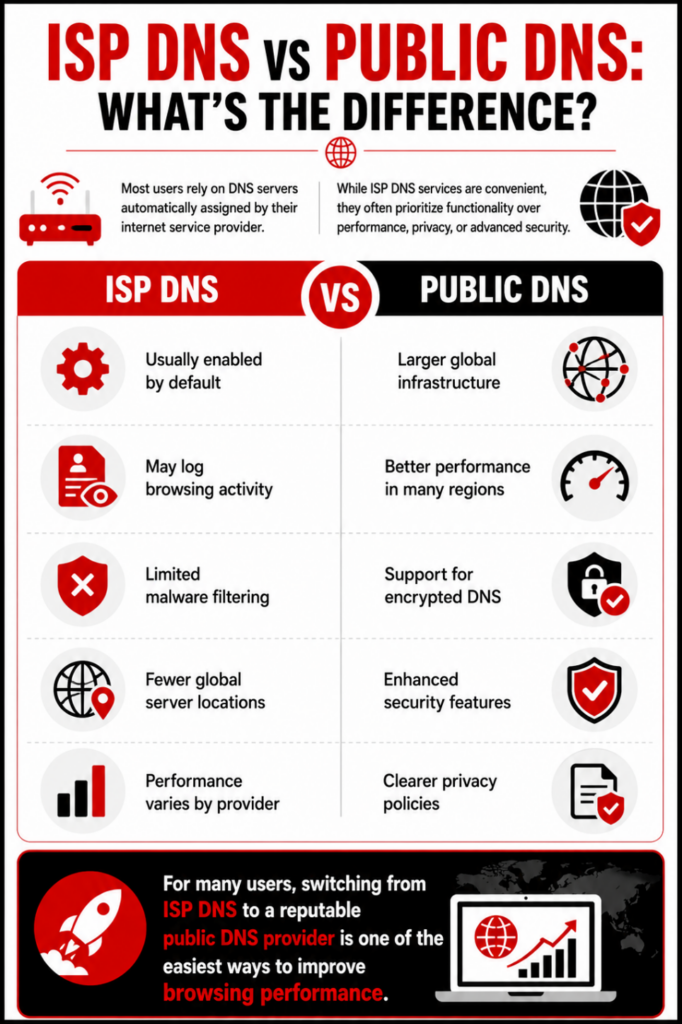
ISP DNS
- Usually enabled by default
- May log browsing activity
- Limited malware filtering
- Fewer global server locations
- Performance varies by provider
Public DNS
- Larger global infrastructure
- Better performance in many regions
- Support for encrypted DNS
- Enhanced security features
- Clearer privacy policies
For many users, switching from ISP DNS to a reputable public DNS provider is one of the easiest ways to improve browsing performance.
Free vs Paid DNS Services
Best Free DNS Servers
Most users do not need a paid DNS service.
Free options such as Cloudflare, Google DNS, Quad9, OpenDNS, and AdGuard DNS provide excellent performance and security.
When Paid DNS Makes Sense
Paid DNS services may be worthwhile if you need:
- Advanced filtering policies
- Detailed analytics
- Custom routing rules
- Enterprise management features
- Enhanced support
Services such as NextDNS and Control D offer premium features that go beyond standard DNS resolution.
DNS Encryption Explained: DoH, DoT & DoQ
Traditional DNS traffic is transmitted in plain text, making it vulnerable to monitoring and manipulation.
Modern DNS providers increasingly support encrypted DNS protocols.
DNS-over-HTTPS (DoH)
DoH sends DNS requests through HTTPS connections, making them appear similar to normal web traffic.
Benefits include:
- Improved privacy
- Reduced monitoring
- Easier firewall traversal
DNS-over-TLS (DoT)
DoT encrypts DNS requests using TLS.
Benefits include:
- Secure DNS communication
- Dedicated DNS encryption channel
- Strong privacy protections
DNS-over-QUIC (DoQ)
DoQ is a newer protocol that combines encryption with the performance benefits of QUIC.
Benefits include:
- Lower latency
- Faster reconnections
- Improved performance on unstable networks
DNSSEC: Verifying DNS Integrity
DNS Security Extensions (DNSSEC) help verify that DNS responses are authentic and have not been altered during transmission.
Without DNSSEC, attackers may attempt DNS spoofing or cache poisoning attacks that redirect users to malicious destinations.
DNSSEC helps prevent:
- DNS hijacking
- Cache poisoning
- Fraudulent DNS responses
- Traffic redirection attacks
Most leading DNS providers now support DNSSEC validation.
How DNS Servers Protect Against Malware & Phishing
DNS has become a critical layer in modern cybersecurity. Threat actors frequently abuse domain infrastructure to distribute malware, launch phishing campaigns, host credential theft pages, and establish command-and-control communications.
Security-focused DNS providers maintain threat intelligence feeds that identify malicious domains before users connect to them.
When a known malicious domain is requested, the DNS resolver blocks the connection before the browser reaches the destination.
This approach does not replace endpoint security or threat detection solutions, but it provides an effective first layer of defense.
Organizations should view DNS security as one component of a broader cybersecurity strategy that includes threat intelligence, attack surface monitoring, endpoint protection, and security awareness training.
How DNS Hijacking Works and How to Prevent It
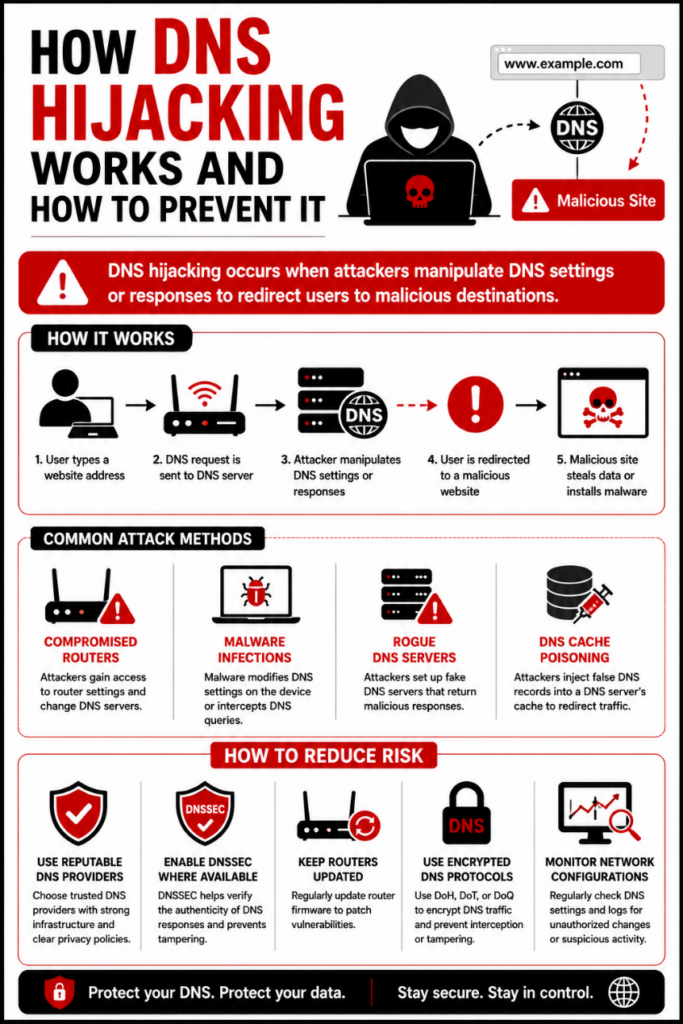
DNS hijacking occurs when attackers manipulate DNS settings or responses to redirect users to malicious destinations.
Common attack methods include:
- Compromised routers
- Malware infections
- Rogue DNS servers
- DNS cache poisoning
How to Reduce Risk
- Use reputable DNS providers
- Enable DNSSEC where available
- Keep routers updated
- Use encrypted DNS protocols
- Monitor network configurations
How to Change Your DNS Server
For Windows
- Open Control Panel.
- Navigate to Network and Sharing Center.
- Select Change Adapter Settings.
- Open your active network connection.
- Select Internet Protocol Version 4 (TCP/IPv4).
- Enter your preferred DNS addresses.
For macOS
- Open System Settings.
- Select Network.
- Choose your active connection.
- Open DNS settings.
- Add your preferred DNS servers.
For Android
- Open Settings.
- Navigate to Network & Internet.
- Select Private DNS.
- Enter your provider hostname.
For iPhone and iPad
- Open Settings.
- Select Wi-Fi.
- Choose your network.
- Open Configure DNS.
- Switch to Manual.
- Enter your preferred DNS addresses.
For Router
Configuring DNS at the router level applies the settings to every connected device, making it the most efficient option for households and businesses.
How to Test Your DNS Speed
Cloudflare (1.1.1.1) is generally the fastest public DNS server, averaging around 11 ms globally. Google Public DNS follows at approximately 20 ms, though actual performance varies by location and network conditions.
To test DNS performance:
- Use DNS Benchmark
- Use Namebench
- Compare results across multiple providers
- Test at different times of day
Because routing varies by ISP and geography, users should always benchmark DNS servers from their own network before making a final decision.
How to Choose the Best DNS Server
The best DNS server depends on what matters most to you. Some users simply want faster website loading times, while others are looking for stronger privacy protections, built-in malware filtering, or advanced customization features.
If speed is your top priority, providers like Cloudflare and Google Public DNS consistently perform well in global benchmarks. Users concerned about phishing attacks and malicious domains may benefit from security-focused services such as Quad9.
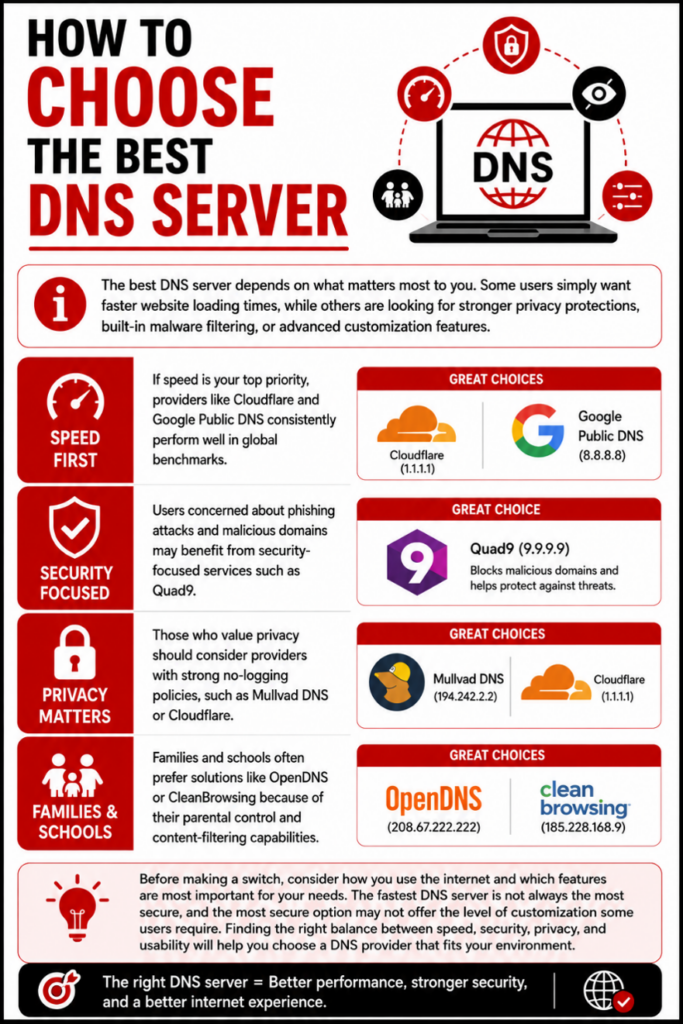
Those who value privacy should consider providers with strong no-logging policies, such as Mullvad DNS or Cloudflare. Families and schools often prefer solutions like OpenDNS or CleanBrowsing because of their parental control and content-filtering capabilities.
Before making a switch, consider how you use the internet and which features are most important for your needs. The fastest DNS server is not always the most secure, and the most secure option may not offer the level of customization some users require. Finding the right balance between speed, security, privacy, and usability will help you choose a DNS provider that fits your environment.
Conclusion
DNS is one of the simplest yet most impactful internet settings you can change. A better DNS provider can improve browsing speed, enhance privacy, strengthen security, and help block malicious domains before they reach your devices.
For most users, Cloudflare remains the best overall DNS server thanks to its combination of speed, privacy, and ease of use. Users focused on security should consider Quad9, while privacy-conscious individuals may prefer Mullvad DNS or NextDNS.
Regardless of which provider you choose, regularly reviewing your DNS configuration and using modern security features such as DNSSEC, DoH, DoT, and DoQ can help create a safer and more resilient online experience.
FAQs About on Best DNS Server
What is a DNS server and why is it important for security?
A DNS server translates domain names into IP addresses, allowing you to access websites. It plays a key role in your internet security, as it can help prevent malicious websites and protect against cyber threats like phishing and malware.
How can DNS servers improve my privacy?
Some DNS servers offer privacy features like not logging your browsing history or blocking trackers. This ensures that your online activity remains private and helps protect against data collection by third parties.
What factors should I consider when choosing a DNS server for speed?
When selecting a DNS server for speed, look for servers with low latency and high uptime. The server’s geographical location can also affect speed, so choose one that’s close to your location for faster response times.
Are there free DNS servers that offer security, privacy, and speed?
Yes, many free DNS servers provide a good balance of security, privacy, and speed. Examples include Cloudflare’s 1.1.1.1, Google DNS, and OpenDNS, which offer strong protection against malware and good performance.
Can I use multiple DNS servers at the same time?
While you can configure multiple DNS servers on your device, most systems will only use the first one in the list unless it’s unavailable. It’s recommended to use a primary and a secondary DNS server for backup in case the primary one fails.
What are some best private dNS?
Top private DNS providers include Cloudflare (1.1.1.1) for speed and privacy, Google DNS (8.8.8.8), OpenDNS (208.67.222.222) with customization, Quad9 (9.9.9.9) for security, and NextDNS for privacy and security features.
What are some good dNS servers for high speed internet?
Some of the best DNS providers for high-speed internet include Cloudflare (1.1.1.1), Google DNS (8.8.8.8), and OpenDNS (208.67.222.222). These services are known for fast response times and reliable performance, helping improve browsing speeds.
What is a private dNS hostname?
A private DNS hostname is a custom domain name used with a private DNS server to route internet traffic securely and privately. It helps protect user data by preventing third-party DNS providers from accessing browsing information.
How can a private dNS server list Help?
A private DNS server list helps by providing a set of trusted DNS servers that enhance privacy, security, and performance. It ensures faster, more secure browsing by using servers that do not track or share your browsing data.
What is the best dns address?
The best DNS address depends on your needs, but some popular options include Cloudflare (1.1.1.1) for speed and privacy, Google DNS (8.8.8.8) for reliability, and OpenDNS (208.67.222.222) for security and customization. Each offers fast performance and robust features.
What are some best dns numbers?
Some of the best DNS numbers for fast, secure, and reliable browsing include Cloudflare’s 1.1.1.1, Google DNS’s 8.8.8.8, OpenDNS’s 208.67.222.222, and Quad9’s 9.9.9.9.
What are some top rated dNS servers?
Some top-rated DNS servers include Cloudflare (1.1.1.1) for speed and privacy, Google DNS (8.8.8.8) for reliability, OpenDNS (208.67.222.222) for customization and security, and Quad9 (9.9.9.9) for enhanced protection against malicious sites.
What are some best nameservers?
Some of the best nameservers include Cloudflare (1.1.1.1), Google DNS (8.8.8.8), OpenDNS (208.67.222.222), and Quad9 (9.9.9.9).
What are some great dNS servers?
Some great DNS servers include Cloudflare (1.1.1.1) for speed and privacy, Google DNS (8.8.8.8) for reliability, OpenDNS (208.67.222.222) for security and customization, and Quad9 (9.9.9.9) for enhanced protection against malicious sites.
What is a dNS public Server?
A DNS public server is a DNS server that is available for anyone to use, providing domain name resolution services to translate domain names into IP addresses.
What is a fast dNS server?
A fast DNS server is one that provides quick domain name resolution, resulting in faster website loading times. Popular fast DNS servers include Cloudflare (1.1.1.1), Google DNS (8.8.8.8), and OpenDNS (208.67.222.222).
What are some Good recommended dNS servers?
Recommended DNS servers for improved performance and security include Cloudflare (1.1.1.1), known for its fast speeds and privacy focus, Google DNS (8.8.8.8), which is reliable and widely used, OpenDNS (208.67.222.222), offering customizable security features, and Quad9 (9.9.9.9), which blocks access to harmful websites.
Which DNS server blocks ads?
AdGuard DNS and NextDNS are popular DNS servers that block ads and trackers.Is it safe to change my DNS server?
Yes. Reputable public DNS providers are generally safe and often offer stronger privacy and security protections than ISP-provided DNS services.
Does changing DNS make the internet faster?
It can. Faster DNS resolution reduces the time required to locate websites, particularly during first-time visits.
Cloudflare vs Google vs Quad9: Which is best?
Cloudflare leads in speed and privacy, Google excels in reliability, and Quad9 offers the strongest built-in malware protection.
What is the fastest DNS server?
Cloudflare 1.1.1.1 consistently ranks among the fastest public DNS services globally.
What is the most secure DNS server?
Quad9 is widely regarded as one of the most secure public DNS providers because of its extensive threat intelligence integrations and malicious domain blocking capabilities.