
In this digital world, securing communication is no longer optional, it’s essential. Whether you are swapping personal messages, confidential company data, or sensitive financial specifics, choosing the right secure messaging app can reduce your exposure to cyber threats. Cybercriminals are now targetting messaging platforms more and more, through phishing, impersonation, account takeovers, and credential theft.
As per the FBI’s Internet Crime Complaint Center (IC3) report, cyber-enabled fraud made up nearly 85% of all reported financial losses in 2025, which led to 452,868 complaints and losses above $17.69 billion. The same report also listed over 3,600 ransomware complaints, so it makes the case for securing today’s digital communications, right now not later.
At the same time, the secure messaging market keeps growing, because individuals and enterprises keep prioritizing privacy, regulatory compliance, and encrypted collaboration. But not every messaging app provides the same protection level. Some only encrypt the message text, while others also limit metadata collection. Some want your phone number for signup, yet privacy-forward alternatives let you register in a totally anonymous way. Knowing these small differences matters before you pick the platform that fits your security needs, properly.
This guide compares the leading secure messaging apps you can access in 2026. Also, in this article we go over how end-to-end encryption (E2EE) actually works, and we spell out the gap between content encryption and metadata protection. And not just that, this article discusses why organizations should pair encrypted communication with proactive brand intelligence and outside threat monitoring.
Key Takeaways
- End-to-end encryption protects message content, but does not necessarily protect metadata.
- Businesses should combine encrypted messaging with proactive brand monitoring and threat intelligence to defend against impersonation, credential leaks, and social engineering attacks.
- Signal remains the strongest overall secure messaging app for privacy-focused users.
- Threema and Session allow anonymous messaging without requiring a phone number.
- Wire offers enterprise-grade encrypted collaboration for organizations.
- WhatsApp provides end-to-end encryption by default but still collects significant metadata.
- Telegram is NOT end-to-end encrypted by default. Only Secret Chats use E2EE.
Why Secure Messaging Apps Matter More Than Ever
Messaging applications have become one of the primary communication channels for individuals and businesses alike. Alongside this growth, they have become attractive targets for cybercriminals.
Threat actors frequently use messaging platforms to distribute phishing links, impersonate trusted contacts, steal credentials, coordinate ransomware attacks, and leak stolen information. Among the most frequently reported cyber-enabled crimes were:
- Extortion
- Investment scams
- Non-payment and non-delivery fraud
- Tech support scams
- Government impersonation
While secure messaging apps cannot eliminate every cyber risk, they significantly reduce the likelihood of attackers intercepting or reading private conversations.
What Makes Secure Messaging Apps Different from Traditional Chat Platforms?
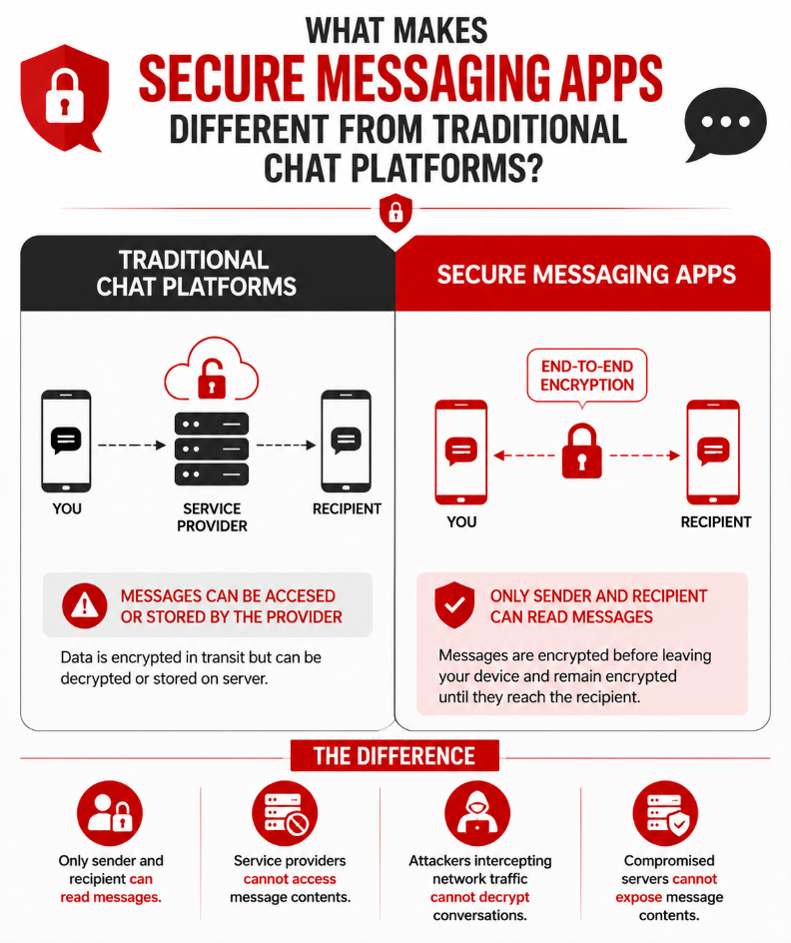
Many traditional messaging platforms encrypt data while it travels between your device and their servers. However, they often retain the ability to decrypt messages or store them in readable form on cloud infrastructure.
Secure messaging apps take a different approach.
Most rely on end-to-end encryption (E2EE), ensuring messages are encrypted before leaving your device and remain encrypted until they reach the intended recipient.
This means:
- Only the sender and recipient can read messages.
- Service providers cannot access message contents.
- Attackers intercepting network traffic cannot decrypt conversations.
- Compromised servers cannot expose message contents.
For businesses, encrypted messaging also supports compliance with privacy regulations, reduces the risk of confidential information being exposed, and strengthens customer trust.
What End-to-End Encryption Protects—and What It Doesn’t
One of the biggest misconceptions about secure messaging is that end-to-end encryption (E2EE) guarantees complete privacy. While E2EE is one of the strongest safeguards for digital communications, its protection has limits.
End-to-end encryption ensures that the content of your conversations—including text messages, photos, videos, documents, and voice or video calls—is encrypted on the sender’s device and can only be decrypted by the intended recipient. Even the messaging service provider cannot read these communications while they are in transit.
However, E2EE does not automatically protect metadata. Metadata refers to information about your communication rather than the communication itself. Depending on the messaging platform, this may include who you’re communicating with, when messages are sent, how frequently you interact, your device information, IP address, or other account-related data.
This distinction is important because metadata can reveal valuable insights into user behavior, even when message contents remain fully encrypted. For example, Signal is designed to collect as little metadata as possible, making it a preferred choice for privacy-conscious users. WhatsApp, while providing end-to-end encryption by default, collects additional metadata to support account management and other platform services. Telegram takes a different approach altogether—its regular chats and group conversations use client-server encryption, while only manually initiated Secret Chats provide end-to-end encryption.
Understanding the difference between message encryption and metadata protection is essential when choosing a secure messaging app. The strongest option isn’t simply the one that encrypts messages, but the one that aligns with your overall privacy expectations and threat model.
How End-to-End Encryption (E2EE) Works
End-to-end encryption is the foundation of secure messaging.
When you send a message:
- Your device encrypts the message using cryptographic keys.
- The encrypted message travels through the provider’s servers.
- The server forwards the encrypted data without being able to read it.
- Only the recipient’s device possesses the keys required to decrypt the message.
Because the encryption keys remain exclusively on user devices, neither hackers nor the messaging provider can access message content during transmission.
Modern secure messaging apps also implement additional security mechanisms such as:
- Forward secrecy
- Perfect forward secrecy
- Ephemeral encryption keys
- Cryptographic key rotation
- Device verification
These features ensure that even if one encryption key is compromised, previously exchanged messages remain protected.
Top 10 Secure Messaging Apps for Encrypted Chats
1. Signal – Best Overall Secure Messaging App
Verified: June 2026
| Feature | Details |
| End-to-End Encryption | Yes (Default) |
| Open Source | Yes |
| Phone Number Required | Yes (Usernames supported) |
| Metadata Collection | Minimal |
| Independent Security Audits | Yes |
| Best For | Privacy-conscious individuals, journalists, professionals |
When cybersecurity professionals recommend a secure messaging app, Signal is almost always at the top of the list. Developed by the non-profit Signal Foundation, the app is widely regarded as the gold standard for private communications thanks to its open-source architecture, minimal data collection, and industry-leading encryption.
Signal uses the Signal Protocol, one of the most trusted encryption frameworks available today. The protocol provides end-to-end encryption, forward secrecy, and post-compromise security, ensuring that every message is encrypted with unique cryptographic keys.
Unlike many messaging platforms, Signal collects very little user information. According to publicly available legal disclosures, the platform retains only the account creation date and the last connection timestamp, making it one of the most privacy-preserving messaging services available.
Key Features
- End-to-end encryption enabled by default
- Open-source codebase
- Encrypted voice and video calls
- Disappearing messages
- Screen security to prevent screenshots on Android
- Encrypted group chats
- Usernames that reduce phone number exposure
- Cross-platform support
Pros
✔ Industry-leading encryption
✔ Minimal metadata collection
✔ Open-source and independently reviewed
✔ No advertising or user tracking
✔ Strong reputation among security researchers
Cons
✖ Phone number required during registration
✖ Smaller user base than WhatsApp
Best for: Users who prioritize privacy without sacrificing usability.
2. Threema – Best Secure Messaging App Without a Phone Number
Verified: June 2026
| Feature | Details |
| End-to-End Encryption | Yes |
| Open Source | Partially |
| Phone Number Required | No |
| Metadata Collection | Very Low |
| Independent Security Audits | Yes |
| Best For | Anonymous communication |
For users seeking anonymity, Threema offers one of the strongest alternatives available. Unlike most messaging platforms, users receive a randomly generated Threema ID, allowing them to communicate without registering a phone number or email address.
This significantly reduces the amount of personally identifiable information linked to your account.
Threema encrypts messages, voice calls, media files, and group chats using end-to-end encryption while minimizing metadata collection wherever possible.
The app is particularly popular among privacy-conscious individuals and organizations operating in Europe, where strict data protection regulations encourage privacy-first communication.
Key Features
- Anonymous account creation
- End-to-end encryption
- Polls and secure group chats
- Encrypted voice calls
- Business version for enterprises
- Local contact synchronization
Pros
✔ No phone number required
✔ Excellent privacy protections
✔ Minimal metadata storage
✔ Secure business communication
Cons
✖ Paid application
✖ Smaller community compared to mainstream apps
Best for: Users seeking anonymous encrypted messaging.
3. Wickr Me – Secure Collaboration for Personal and Business Use
Verified: June 2026
| Feature | Details |
| End-to-End Encryption | Yes |
| Open Source | No |
| Phone Number Required | No |
| Metadata Collection | Low |
| Independent Security Audits | Limited |
| Best For | Secure collaboration |
Wickr Me has built its reputation around secure collaboration by combining encrypted messaging with advanced privacy controls.
Messages automatically expire based on user-defined timers, reducing the amount of sensitive information stored on devices. The platform also includes secure file sharing, encrypted voice calls, and group messaging.
One of Wickr’s distinguishing features is its focus on operational security. Users can configure message expiration, burn-on-read functionality, and screenshot notifications, making it suitable for conversations involving sensitive information.
Key Features
- Military-grade encryption
- Secure file transfers
- Self-destructing messages
- Voice and video calling
- Group collaboration
- Screenshot detection
Pros
✔ Strong privacy controls
✔ Flexible message expiration
✔ Secure file sharing
✔ Suitable for sensitive communications
Cons
✖ Interface may feel complex
✖ Smaller ecosystem than competitors
Best for: Professionals requiring secure collaboration with advanced privacy controls.
4. Wire – Best Secure Messaging App for Businesses
Verified: June 2026
| Feature | Details |
| End-to-End Encryption | Yes |
| Open Source | Yes |
| Phone Number Required | Yes |
| Metadata Collection | Moderate |
| Independent Security Audits | Yes |
| Best For | Enterprise collaboration |
Wire was designed with enterprise collaboration in mind, combining secure messaging, encrypted meetings, file sharing, and team management into a single platform.
The platform supports compliance-focused organizations by offering centralized administration, identity management, and enterprise deployment options while maintaining end-to-end encryption across communications.
Unlike consumer-focused messaging platforms, Wire includes administrative controls, secure guest access, and collaborative workspaces that make it particularly attractive for businesses handling sensitive information.
Key Features
- End-to-end encrypted messaging
- Secure conferencing
- File sharing
- Team collaboration
- Enterprise administration
- Multi-device synchronization
Pros
✔ Excellent enterprise security
✔ GDPR-focused design
✔ Secure collaboration features
✔ Open-source encryption
Cons
✖ Registration required
✖ Consumer adoption remains limited
Best for: Businesses requiring encrypted collaboration and regulatory compliance.
5. Session – Best Decentralized Messaging App
Verified: June 2026
| Feature | Details |
| End-to-End Encryption | Yes |
| Open Source | Yes |
| Phone Number Required | No |
| Metadata Collection | Minimal |
| Independent Security Audits | Community reviewed |
| Best For | Maximum anonymity |
Session takes privacy one step further by removing centralized infrastructure entirely.
Instead of routing messages through traditional servers, Session uses a decentralized network that helps obscure user identities and significantly reduces metadata collection.
No phone number or email address is required, making it one of the strongest choices for users concerned about surveillance or identity exposure.
The trade-off is slightly slower message delivery compared to mainstream messaging platforms, but many users consider the privacy benefits worthwhile.
Key Features
- Decentralized architecture
- Anonymous registration
- End-to-end encryption
- Minimal metadata collection
- Open-source development
- Cross-platform support
Pros
✔ No phone number required
✔ Extremely privacy-focused
✔ Decentralized infrastructure
✔ Minimal metadata exposure
Cons
✖ Slower message synchronization
✖ Smaller user community
✖ Fewer collaboration features
Best for: Users seeking the highest level of anonymity and decentralized communication.
6. WhatsApp – Best for Everyday Encrypted Messaging
Verified: June 2026
| Feature | Details |
| End-to-End Encryption | Yes (Default) |
| Open Source | No |
| Phone Number Required | Yes |
| Metadata Collection | High |
| Independent Security Audits | Encryption protocol reviewed |
| Best For | Everyday communication |
With more than 3 billion monthly active users, WhatsApp remains the world’s most widely used encrypted messaging application. It uses the Signal Protocol to provide end-to-end encryption for personal chats, voice calls, video calls, and shared media by default.
However, encryption alone does not guarantee complete privacy.
While WhatsApp protects the contents of your conversations, it still collects metadata such as account information, device identifiers, contacts (with permission), usage information, and interaction patterns to support platform operations and account management.
Another important consideration is cloud backups. If users enable backups to cloud storage without encrypted backup protection, those backups may not offer the same level of security as messages in transit. Users should enable encrypted backups whenever available for additional protection.
For most users, WhatsApp strikes an excellent balance between security, convenience, and accessibility. However, individuals with higher privacy requirements may prefer platforms that collect significantly less metadata.
Key Features
- End-to-end encryption enabled by default
- Voice and video calls
- Group chats and Communities
- Disappearing messages
- Encrypted backups (optional)
- Multi-device support
- Business messaging
Pros
✔ Familiar interface
✔ Largest global user base
✔ Strong end-to-end encryption
✔ Excellent cross-platform support
✔ Frequent security updates
Cons
✖ Significant metadata collection
✖ Closed-source application
✖ Owned by Meta
Best for: Everyday personal communication with strong built-in encryption.
7. Element – Best Open-Source Collaboration Platform
Verified: June 2026
| Feature | Details |
| End-to-End Encryption | Yes |
| Open Source | Yes |
| Phone Number Required | Optional |
| Metadata Collection | Low |
| Independent Security Audits | Yes |
| Best For | Teams, developers, enterprises |
Element is built on the Matrix protocol, an open standard for decentralized communication that gives organizations greater control over their messaging infrastructure.
Unlike most mainstream messaging platforms, organizations can self-host Matrix servers, allowing complete ownership of communication data and compliance with strict regulatory requirements.
Element supports encrypted messaging, secure video meetings, file sharing, and federated communication across multiple organizations.
Its flexibility makes it particularly attractive for enterprises, government agencies, developers, and organizations that require data sovereignty.
Key Features
- Matrix-based decentralized communication
- End-to-end encrypted messaging
- Self-hosting capability
- Secure video conferencing
- Enterprise administration
- Cross-platform synchronization
Pros
✔ Fully open source
✔ Self-hosting available
✔ Strong enterprise capabilities
✔ Excellent for regulated industries
Cons
✖ Steeper learning curve
✖ More complex setup than consumer apps
Best for: Organizations requiring complete control over communication infrastructure.
8. Tox – Best Peer-to-Peer Secure Messaging App
Verified: June 2026
| Feature | Details |
| End-to-End Encryption | Yes |
| Open Source | Yes |
| Phone Number Required | No |
| Metadata Collection | Minimal |
| Independent Security Audits | Community reviewed |
| Best For | Peer-to-peer communication |
Tox eliminates centralized servers entirely by connecting users directly through a peer-to-peer network.
Without centralized infrastructure, there are fewer opportunities for third parties to collect metadata or intercept communications.
Tox supports encrypted messaging, voice calls, video calls, and file sharing while maintaining a lightweight architecture suitable for users who prioritize decentralization.
Although the platform lacks the polish and ecosystem of commercial messaging applications, it remains popular among privacy enthusiasts who prefer community-driven software.
Key Features
- Peer-to-peer architecture
- End-to-end encryption
- Open-source development
- Voice and video calls
- File sharing
- No registration required
Pros
✔ No central servers
✔ No account registration
✔ Open-source software
✔ Minimal metadata exposure
Cons
✖ Smaller community
✖ Limited development resources
✖ Occasional stability issues
Best for: Users seeking decentralized communication without centralized servers.
9. Keybase – Best for Secure File Sharing and Teams
Verified: June 2026
| Feature | Details |
| End-to-End Encryption | Yes |
| Open Source | Yes |
| Phone Number Required | Yes |
| Metadata Collection | Moderate |
| Independent Security Audits | Yes |
| Best For | Teams and secure collaboration |
Keybase combines encrypted messaging with secure cloud storage, cryptographic identity verification, and collaborative workspaces.
Unlike traditional messaging platforms, Keybase emphasizes cryptographic identity. Users can verify ownership of social media accounts, GitHub profiles, domains, and websites through public-key cryptography, providing greater confidence in digital identities.
The platform also supports encrypted file storage, making it particularly useful for technical teams, developers, and organizations sharing confidential documents.
Key Features
- End-to-end encrypted messaging
- Secure file storage
- Team workspaces
- Public-key identity verification
- Cross-platform support
- Open-source software
Pros
✔ Excellent secure file sharing
✔ Identity verification features
✔ Strong encryption
✔ Developer-friendly
Cons
✖ Interface can feel complex
✖ Less suitable for casual messaging
Best for: Technical teams that require secure communication and encrypted file collaboration.
10. Telegram – Feature-Rich Messaging with Important Privacy Considerations
Verified: June 2026
| Feature | Details |
| End-to-End Encryption | Secret Chats Only |
| Open Source | Partial |
| Phone Number Required | Yes |
| Metadata Collection | Moderate to High |
| Independent Security Audits | Limited |
| Best For | Large communities and public channels |
Telegram is one of the fastest-growing messaging platforms globally, offering cloud-based messaging, large group chats, channels, bots, and extensive customization.
However, it is important to understand one critical limitation:
Telegram does not use end-to-end encryption by default.
Regular one-to-one chats, cloud chats, and all group conversations use client-server encryption, meaning messages are encrypted between your device and Telegram’s servers but are stored in Telegram’s cloud.
Only Secret Chats provide true end-to-end encryption, and users must manually start these conversations. Secret Chats are limited to one-to-one conversations and do not synchronize across multiple devices.
For everyday communication, Telegram provides a convenient feature-rich experience. However, users exchanging highly sensitive information should consider apps where end-to-end encryption is enabled by default.
Key Features
- Cloud synchronization
- Secret Chats
- Large communities
- Channels
- Bots and automation
- File sharing up to 2 GB
- Cross-platform support
Pros
✔ Rich feature set
✔ Excellent group management
✔ Fast synchronization
✔ Powerful API ecosystem
✔ Large user community
Cons
✖ End-to-end encryption is not enabled by default
✖ Group chats are not end-to-end encrypted
✖ Cloud chats remain on Telegram servers
Best for: Communities, public broadcasts, and feature-rich messaging rather than maximum privacy.
Quick Comparison of the Best Secure Messaging Apps
| App | E2EE by Default | Open Source | Phone Number Required | Metadata Collection | Best For |
| Signal | ✔ Yes | ✔ Yes | Yes | Minimal | Overall privacy |
| Threema | ✔ Yes | Partial | No | Very Low | Anonymous messaging |
| Wickr Me | ✔ Yes | No | No | Low | Secure collaboration |
| Wire | ✔ Yes | ✔ Yes | Yes | Moderate | Business communication |
| Session | ✔ Yes | ✔ Yes | No | Minimal | Anonymous decentralized messaging |
| ✔ Yes | No | Yes | High | Everyday messaging | |
| Element | ✔ Yes | ✔ Yes | Optional | Low | Enterprise & Matrix users |
| Tox | ✔ Yes | ✔ Yes | No | Minimal | Peer-to-peer messaging |
| Keybase | ✔ Yes | ✔ Yes | Yes | Moderate | Secure teams & file sharing |
| Telegram | Secret Chats Only | Partial | Yes | High | Feature-rich messaging |
What Features Should You Look for in a Secure Messaging App?
Not all secure messaging apps offer the same level of privacy or security. Before choosing one, consider the features that best align with your communication needs and threat model.
End-to-End Encryption
Ensure the app enables end-to-end encryption by default, so only you and the intended recipient can read your messages.
Metadata Protection
Some apps encrypt message content but still collect metadata such as contact information, communication timestamps, and device details. Privacy-focused apps minimize this data collection.
Open-Source Code
Open-source messaging apps allow independent security researchers to review their code, improving transparency and trust.
Anonymous Registration
If anonymity is important, choose platforms that don’t require a phone number or email address for registration.
Multi-Platform Support
Consider whether the app works across smartphones, desktops, tablets, and web browsers while maintaining encryption.
Business and Collaboration Features
Organizations may need secure file sharing, encrypted group chats, administrative controls, compliance support, and integration with existing workflows.
Regular Security Updates
Choose apps that are actively maintained and regularly patched against newly discovered vulnerabilities.
What Is Forward Secrecy?
Forward secrecy is an advanced security feature implemented by leading secure messaging apps.
Instead of using one encryption key forever, forward secrecy generates new cryptographic keys continuously.
This means that if an attacker somehow obtains one encryption key today, previously exchanged conversations remain protected because they were encrypted using different keys.
Signal’s encryption protocol is widely regarded as one of the strongest implementations of forward secrecy and has influenced several modern messaging platforms.
What Is the Signal Protocol?
Many secure messaging applications—including Signal and WhatsApp—rely on the Signal Protocol, one of the most extensively reviewed encryption frameworks in modern cybersecurity.
The protocol combines advanced cryptographic techniques such as the Double Ratchet algorithm and Extended Triple Diffie-Hellman (X3DH) key agreement to provide:
- End-to-end encryption
- Forward secrecy
- Post-compromise security
- Strong resistance against message interception
Its open-source design allows independent researchers to continuously evaluate its security, making it one of the most trusted encryption protocols available today.
Enterprise Security Goes Beyond Encrypted Messaging
Secure messaging apps play a critical role in protecting conversations, but organizations face threats that extend far beyond encrypted communications.
Attackers increasingly exploit messaging platforms to distribute phishing campaigns, impersonate executives, leak stolen credentials, coordinate ransomware operations, and conduct social engineering attacks. These threats often originate outside an organization’s internal communication channels, making end-to-end encryption only one layer of defense.
To build a more comprehensive security posture, businesses need visibility into risks emerging across the surface web, deep web, dark web, social media platforms, messaging channels, and fraudulent domains.
Why Organizations Need External Threat Monitoring
Even the most secure messaging application cannot:
- Detect fake websites impersonating your brand.
- Identify fraudulent social media accounts.
- Monitor Telegram channels discussing your organization.
- Discover leaked employee credentials on dark web marketplaces.
- Prevent attackers from abusing your brand identity.
This is where external threat intelligence becomes essential.
Strengthen Your Security with Cyble Brand Intelligence & Protection
While encrypted messaging protects conversations, organizations also need visibility into threats that exist beyond their communication channels. Cybercriminals increasingly exploit fake websites, impersonation campaigns, leaked credentials, malicious social media accounts, and underground forums to target businesses and their employees—risks that encrypted messaging apps alone cannot address.
Cyble Brand Intelligence & Protection helps organizations safeguard their digital presence through continuous monitoring of domains, social media platforms, messaging channels such as Telegram, mobile applications, and the surface, deep, and dark web. By combining brand intelligence, threat intelligence, fake domain detection, social media monitoring, dark web monitoring, and rapid takedown capabilities, the platform enables security teams to identify and respond to emerging threats before they escalate into larger security incidents.
With a 98.5% takedown success rate, Cyble helps organizations quickly disrupt phishing campaigns, remove fraudulent assets, and reduce the impact of brand abuse. By pairing secure messaging applications with proactive external threat intelligence, businesses can build a multi-layered security strategy that protects both confidential communications and their broader digital ecosystem.
Conclusion
Encrypted messaging is an essential first step toward protecting sensitive communications—but today’s cyber threats extend well beyond private chats.
Organizations need visibility into impersonation attempts, phishing campaigns, leaked credentials, fake domains, malicious mobile applications, and underground criminal activity targeting their brand.
Cyble Brand Intelligence & Protection empowers security teams with continuous monitoring across the surface web, deep web, dark web, social media, messaging platforms, and domain infrastructure. By combining AI-driven intelligence with rapid takedown capabilities, organizations can detect threats earlier, reduce response times, and strengthen their overall cyber resilience.
FAQ Abouts Secure Messaging Apps
Which messaging app is the most secure?
Signal is considered the most secure due to end-to-end encryption and minimal metadata storage.What is end-to-end encryption?
End-to-end encryption (E2EE) ensures that messages are encrypted on the sender’s device and can only be decrypted by the intended recipient. Even the messaging service provider cannot read the contents of encrypted conversations.
Does end-to-end encryption hide metadata?
No. While E2EE protects message content, many messaging platforms still collect metadata such as contact information, timestamps, device identifiers, and communication patterns. Privacy-focused apps like Signal and Session minimize metadata collection more effectively than many mainstream alternatives.
Is WhatsApp secure?
Yes. WhatsApp uses end-to-end encryption by default for personal messages, voice calls, and video calls. However, users should be aware that WhatsApp collects metadata for operational purposes, and encrypted cloud backups should be enabled to improve overall security.
Is Telegram end-to-end encrypted?
Not by default. Telegram’s regular chats and all group conversations use client-server encryption. Only Secret Chats provide true end-to-end encryption, and users must manually initiate them for one-to-one conversations.
Which secure messaging app is best for businesses?
Wire and Element are among the strongest choices for organizations because they provide encrypted collaboration, enterprise administration, compliance support, and secure file sharing.
Businesses should also combine secure messaging with external threat intelligence solutions to detect phishing campaigns, leaked credentials, and brand impersonation.Can hackers read end-to-end encrypted messages?
Properly implemented end-to-end encryption prevents attackers from reading messages during transmission.
However, compromised devices, phishing attacks, malware infections, weak passwords, or unencrypted cloud backups can still expose sensitive information.