Its no longer the 90s. All your day-to-day chores are now done online. Be it shopping, repairs or banking. Everything is online. So, it is more important than ever to stay safe in digital spaces. Every click, download, and message can bring you to a state of risk or unknown consequences.
As the risks of cybercrime continue to increase, remaining aware is no longer an option; it’s now a mandatory requirement. Statista states the global cybersecurity market is projected to reach $196.51 billion by 2025 and $262.29 billion a short five years later, which reflects continued upward investment from people and organizations for online safety.
However, while some of the online safety tools and services are growing in sophistication, genuine safety begins with people’s awareness. Directly, here are 55 online safety tips to help you stay safe online and protect your digital identity.
1. Choose Strong, Unique Passwords
Using a weak password is basically inviting hackers to access your account. Don’t use a simple password like “John123.” It is easy to hack. Create a combination of letters, numbers, and special characters. For example, a strong password would be something like “J0hn!@89House.”
2. Use Two-Factor Authentication

Even if someone has access to your password, they won’t be able to get into your account without another form of verification. Lots of apps, including email and social media networks, are starting to make this process simple.
3. Do Not Reuse Passwords
Reusing a password from account to account greatly increases the chances of a hacker being able to access your entire life. A password manager could be the solution to keeping your passwords organized and easy to remember.
4. Be Cautious on Public Wi-Fi
Public Wi-Fi is convenient, but it can be dangerous. Banking on a public Wi-Fi network, or putting in personal information, is a recipe for disaster. If you can, use a VPN to protect your personal information when using public Wi-Fi.
5. Update Every Device Regularly
All updates fix security patches and vulnerabilities. Make sure your phone, laptop, and apps (not just your browser) are updated. Consider updating to the latest software and operating system automatically in order to block threats before they occur.
6. Don’t Click Without Thinking First
It’s common for phishing emails to look real. Be cautious of links in your email. Always double-check the address and hover the link over it before clicking.
7. Do Regular Backups of Your Data
Utilize third-party cloud storage applications or external hard drives. In the event of a ransomware incident, having a backup of your information will allow you to restore your data without paying the ransom.
8. Check App Permissions
Many apps ask for access to data or feature that do not apply. If a media app is asking for permission to access your contacts or microphone or location, and you’re not using any part of the app that would need that data or feature, you should revoke that permission.
9. Log out from public/shared devices
When you are finished using a public computer, or any shared device such as a hotel or office computer, always log out and clear browser history. It only takes a moment and it’s a simple but necessary step.
10. Check Account Activity and Alerts
Watch for login alerts or unusual activity in your account. If there is a problem, early detection will help prevent larger issues.
11. Don’t Over-Share Information on Social Media
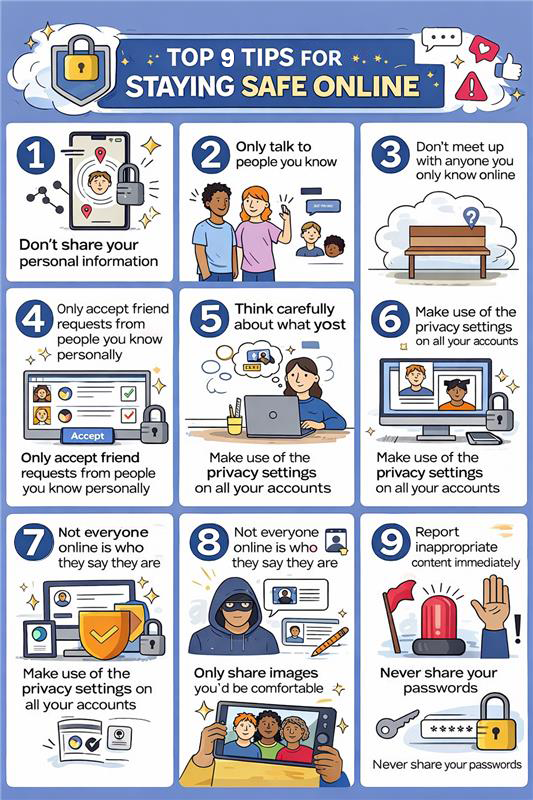
It’s best not to share certain information, such as your home address or when you go on vacation. If your social media is public, cybercriminals can take the information for scams or identity theft.
12. Only Download Software from Trusted Entities
Apps or software downloaded from untrusted sites may hide malware in the download. Download software only from official app stores or verified software vendors.
13. Use Antivirus or Anti-Malware Software
Reliable security software is your first line of defense against malicious files.
14. Use Caution with Email Attachments
Always check the sender before opening any attachments, other than the obvious email from someone you know.
15. Lock Devices
Lock your devices with a PIN, pattern, or biometrics (fingerprint, facial recognition). If you leave your phone or laptop unattended, locking it will prevent unauthorized access to your information.
16. Review Privacy Settings Regularly
Social media companies often change their privacy settings. Be sure to review your settings regularly if you want to control who has access to your information.
17. Use a Webcam Cover
A simple webcam cover can stop someone from spying on you. Many malicious hackers use webcams to breach your privacy.
18. Encourage Children to Build Safe Internet Habits
Teach children to think critically about the information they share or who they talk with online. Being mindful of cyber safety is a skill that children should learn early to build their whole lives.
19. Don’t Be Trusting About “Free”
If it sounds too good to be true – like a free gadget or a game – it’s probably not. Scammers will use free things to steal your information.
20. Be Choosey of Your Online Friends
Not everyone online is as they say. Accept requests from people that you actually know.
21. Avoid Saving Payment Details on Shopping Websites
Saving card details may be convenient, but it increases risk if the site is hacked. Enter your payment information only when needed.
22. Use Encrypted Messaging Apps for Sensitive Conversations
Encrypted apps protect your messages from being read by others. This keeps private conversations secure.
23. Don’t Click Random Pop-Ups Promising “System Repairs”
These pop-ups are often scams or malware. Close them immediately instead of clicking.
24. Be Wary of Fake Tech-Support Calls
Legitimate companies do not call unexpectedly. Never give remote access or personal details over the phone.
25. Shred Old Documents Before Discarding Them
Documents with personal information can be stolen from the trash. Shredding prevents identity theft.
26. Keep Smart Home Devices on a Separate Network
Using a separate network limits damage if one device is hacked. It protects your main devices.
27. Review Financial Statements Monthly
Checking statements helps you spot unauthorized charges early. Report anything suspicious right away.
28. Don’t Share One-Time Passwords with Anyone
One-time passwords are meant only for you. Sharing them can give others full account access.
29. Use Secure Websites — Look for “https://”
Secure websites encrypt your data. Avoid entering personal information on sites without “https.”
30. Install Browser Extensions That Block Trackers
Trackers collect your online activity. Blocking them improves privacy and security.
31. Limit Access to Personal Photos and Videos Online
Once shared, content can be hard to control. Use privacy settings carefully.
32. Turn Off Bluetooth When Not in Use
Leaving Bluetooth on can expose your device to attacks. Turn it off to reduce risk.
33. Avoid Posting About Your Workplace or Internal Information
Sharing work details can expose sensitive information. Keep professional data private.
34. Be Cautious of Surveys Asking for Too Much Personal Data
Some surveys are designed to collect personal information. Only answer the trusted and necessary ones.
35. Secure Your Home Wi-Fi with a Strong Password
Weak Wi-Fi passwords allow unauthorized access. Use a strong, unique password.
36. Don’t Use Public Computers for Online Banking
Public computers may store your information. Only bank on personal, trusted devices.
37. Clear Cookies and Cache Regularly
Stored data can track your activity. Clearing it helps protect your privacy.
38. Always Verify Charity Links Before Donating Online
Scammers often fake charities. Check the organization before donating.
39. Use Parental Control Tools for Kids’ Safety
These tools help limit exposure to harmful content. They also monitor online activity.
40. Read Terms and Privacy Policies Before Signing Up
Policies explain how your data is used. Knowing this helps you make informed choices.
41. Disable Autofill for Sensitive Forms
Autofill can expose personal data. Manually entering details is safer.
42. Avoid Using Your Main Email for Subscriptions
Subscriptions can lead to spam or data leaks. Use a secondary email instead.
43. Keep Your Operating System Updated
Updates fix security flaws. Staying updated protects your device from threats.
44. Report Suspicious Online Behavior or Messages
Reporting helps stop scams from spreading. It also protects others.
45. Learn to Recognize Fake Job or Investment Offers
If it sounds too good to be true, it probably is. Research before responding.
46. Use Different Browsers for Different Tasks
Separating tasks limits exposure if one browser is compromised. This adds an extra layer of safety.
47. Turn On Device Location Tracking for Theft Recovery
Location tracking helps recover lost or stolen devices. Enable it in your settings.
48. Always Log Out from Financial or Government Websites
Logging out prevents unauthorized access. Especially important on shared devices.
49. Trust Your Instincts — If Something Feels Off, Skip It
Scams often rely on pressure or urgency. Pausing can protect you from mistakes.
50. Regularly Review App Permissions
Apps may access more data than they need. Checking permissions helps protect your privacy and personal information.
Why Online Awareness Matters
Cybercriminals are not only after the large corporations but also after people. The whole spectrum, from phishing emails to identity theft, is accessible to everyone. Enforcing safe internet practices can cut these risks down to size. If internet safety rules are followed, a very secure online presence can be created.
Even though personal vigilance is very important, knowing what threats are out there that could affect your organization or personal data gives you an extra layer of protection. Companies such as Cyble offer deep web and dark web monitoring, which means that detection of data breaches or leaked credentials can happen at an early stage.
Their solutions allow both individuals and enterprises to see potential threats in real time and react proactively without disturbing the daily digital activities. It is a demonstration of how intelligence-driven monitoring is supporting your efforts to protect your online identity.
Conclusion
Participating is the only way to achieve real safety. Promote digital security measures and awareness among your family, coworkers, and friends. Just a brief chat on online privacy tips might save a person from a phishing scam.
The internet is a great connector but at the same time requires us to be responsible. The application of these 55 online security measures would enable one to regain control over one’s security, data protection, and hassle-free digital world navigation.
It is important to note that online security is not a one-off activity; rather, it is a consistent practice that enables one to safeguard one’s digital existence and be safe online daily.
FAQs About Online Safety Tips
What are online safety tips?
Online safety tips are best practices that help protect users from cyber threats such as hacking, phishing, identity theft, scams, and online fraud while using the internet.
Why are online safety tips important?
Online safety tips are important because they help safeguard personal information, financial data, and digital identities from cybercriminals and online threats.
What are the basic online safety tips everyone should follow?
Basic online safety tips include using strong passwords, enabling two-factor authentication, avoiding suspicious links, updating software regularly, and using secure networks.
How can I stay safe online from hackers?
You can stay safe from hackers by using unique passwords, installing antivirus software, avoiding public Wi-Fi for sensitive activities, and keeping your devices updated.
What are the best online safety tips for social media users?
Best online safety tips for social media include setting privacy controls, avoiding oversharing personal information, accepting requests only from known people, and reporting suspicious accounts.
How can parents teach online safety tips to children?
Parents can teach online safety tips by setting screen time limits, using parental controls, educating children about cyberbullying, and warning them not to share personal details online.
What are online safety tips for students?
Online safety tips for students include protecting login credentials, avoiding plagiarism sites, being cautious while downloading files, and recognizing phishing emails.
How can seniors follow online safety tips to avoid scams?
Seniors should follow online safety tips like not sharing personal or banking details, verifying unknown callers or emails, and using trusted websites for online transactions.
What are online safety tips for online shopping?
Online shopping safety tips include shopping on HTTPS websites, using secure payment methods, avoiding deals that seem too good to be true, and checking seller reviews.
How do online safety tips protect personal data?
Online safety tips protect personal data by reducing exposure to malware, preventing unauthorized access, and ensuring secure communication and data storage.
What are common online threats that safety tips help prevent?
Online safety tips help prevent phishing attacks, malware infections, identity theft, ransomware attacks, and financial fraud.
How often should I update my passwords for better online safety?
For better online safety, passwords should be updated every 3–6 months, especially for email, banking, and social media accounts.
Are free antivirus tools enough for online safety?
Free antivirus tools provide basic protection, but for better online safety, paid solutions offer advanced features like real-time monitoring and phishing protection.
What role does two-factor authentication play in online safety?
Two-factor authentication adds an extra security layer by requiring a second verification step, making it harder for attackers to access accounts.
How can businesses implement online safety tips for employees?
Businesses can implement online safety tips by providing cybersecurity training, enforcing password policies, using secure networks, and monitoring suspicious activities.