Key Takeaways
Scams
- This blog sheds light on a new Tech Scam wherein scammers employ deceptive tactics to lure users into paying for non-existent antivirus solutions.
- Uncovering Tech Scammers possible involvement in different ransomware attacks.
- The IP address of a domain used in this scam is associated with both the TORZON MARKETPLACE, a DarkWeb marketplace, and the “Chai Urgent Care” phishing campaign.
- A fake LinkedIn talent acquisition profile was also discovered, utilizing a fabricated persona found on the phishing site.
Overview
Tech scams involve fraudulent online activities where scammers deceive users by convincing them that their computer or device has issues, subsequently charging them for unnecessary technical support or services. These scammers often employ executable files as a means of perpetrating their schemes. For instance, they might send emails or messages containing phishing links or attachments disguised to appear legitimate but actually contain malicious software. This malicious application primarily generates fake pop-ups or messages, pressuring users into paying for supposed technical support or services.
Cyble Research and Intelligence Labs (CRIL) have reported on multiple tech scams in the past; here are some of the notable ones:
- https://cyble.com/blog/massive-tech-support-scam-exposed/
- https://cyble.com/blog/blue-screen-of-death-scams-target-users-visiting-fake-adult-sites/
CRIL has recently observed a new Tech Scam campaign. One instance involved scammers setting up a non-existent antivirus solution site to deceive users into paying for non-existent services. During our analysis, we encountered various ransomware variants leveraged by tech scammers to propagate their fraudulent schemes.
A thorough investigation into the phishing site associated with this campaign revealed that its IP address has a history of involvement in various scam campaigns and is even associated with a DarkWeb marketplace.
Campaign Analysis
CRIL uncovered a dropper responsible for distributing several malware payloads, namely CraxsRAT, a Downloader, and a variant of Chaos ransomware. This downloader and ransomware are utilized to propagate Tech Scams.
The downloader proceeds to download four additional payloads. Upon execution, each of these payloads is utilized to propagate the deceptive AntiVirus website. The figure below shows the infection chain.


Initial Dropper
The dropper is a 32-bit .Net executable (SHA256: fbb8f0231c666f7b1bfb9256b60b73bc3f44779eb2865b040ca01a3d0a4e1140).
The dropper contains three embedded payloads within its Resources, as depicted in the figure below. When executed, the dropper employs Gzip decompression to extract these payloads, which are then placed in the %temp% directory and subsequently executed.

Following are the details of the payloads.
| Payload Name | Malware |
| Yotgnbkedhvtxc.exe | CraxsRAT |
| Vippqmccfq.exe | Downloader |
| Pwdsueslxagy.exe | Variant of chaos ransomware |
Vippqmccfq.exe -Downloader
This file is a .Net downloader (sha256:
0860a8f9d5debc37dc997a501c593b0eb5f17d5e4ec27e41bec09c606309c0a5). It retrieves a batch script from Resources. It then places this file in the %temp% folder, naming it “Gwpuae.bat.” The following illustration presents the code responsible for dropping and subsequently running the batch file.

This batch script downloads additional payloads from a typosquatted domain hosted on GitHub pages and saves them to the %AppData% directory. The figure below shows the commands used by the batch script to download additional payloads.

This batch script attempts to download four payloads, such as Microsoft Services.exe, System.exe, Runtime Broker.exe, and windows.exe, from the same hosting site and executes them. All of these executables point to the same non-existent antivirus site (www[.]bit[.]ly\secure-net) and telegram handle (@securenet_global).
Microsoft Services.exe: Tech Scam Executable
This file is a 32-bit binary and uses TimeStomping; an anti-forensic technique. (SHA256: d79f5fe23a82b67205037c268f2fed92d727bf4215b20fa21c8a765e20661362)
Upon execution, this file will overlay a warning message on the victim’s desktop, as depicted in the figure below. The design of this alert is intentionally crafted to prevent the user from closing it or accessing other applications on their system. However, it’s crucial to note that this message is a deceptive alert. The warning prompts users to visit a specific website or contact someone via Telegram, likely with malicious intentions.
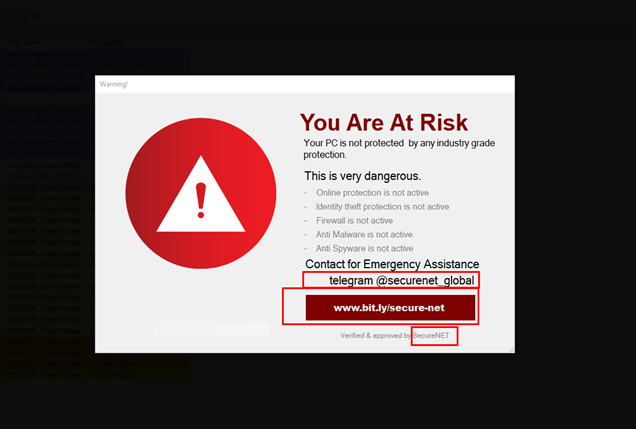
This executable also uses persistence by making an entry to the “SOFTWARE\\Microsoft\\Windows\\CurrentVersion\\Run” key. So, it will automatically execute this file when a user logs in or restart the system.
The figure below shows the code for persistence.

System.exe: Chaos ransomware variant
This file (SHA256: c14ba9911b3d9f3f85a600f84538c9ee90dbd627ec3831bb89745a71bc0db16b) is a variant of Chaos ransomware. CRIL has reported on multiple variants of Chaos ransomware in the past; a few of them can be found below:
- https://cyble.com/blog/blacksnake-ransomware-emerges-from-chaos-ransomwares-shadow/
- https://cyble.com/blog/obsidian-orb-ransomware-demands-gift-cards-as-payment/
- https://cyble.com/blog/unveiling-wagner-groups-cyber-recruitment/
Upon execution, the ransomware encrypts files and alters their names by adding the “.encp” extension. Additionally, it drops a ransom note named “READ_ME.txt.” The scammer customizes the ransomware binary and steers victims toward the fraudulent antivirus website, as shown below.
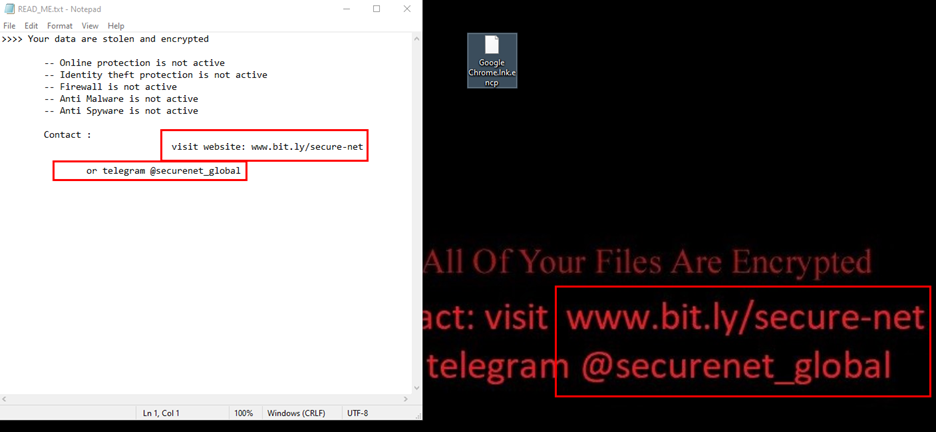
Runtime Broker.exe: LockBit Black Ransomware Variant
The specified file (SHA256: b38943f777ec2cb42abe5ef35b5d2933ce65e3aa3915d7d62bc1cd75c7586886) is identified as a variant of the LockBit Black ransomware. This variant seems to have been generated using the leaked LockBit Black builder from 2022. The illustration below displays both the ransom note and the wallpaper that this strain of ransomware has employed.

windows.exe: Downloader of NoCry ransomware variant
This file (SHA256: f6eaa0d761f364d68443445b43ee4ebf722af3e65319c26bf136cda50a532685) is a .Net downloader. Upon execution, it drops a batch script named “Jdomsoqo.bat” in the %temp% directory and executes it. The figure below shows the code for dropping and executing the batch script.

This batch script further downloads a ransomware payload named “Start.exe” using a PowerShell command and saves it in the “AppData” directory. The figure below shows the content of the batch script.

This ransomware binary “Start.exe” is a variant of NoCry ransomware. (SHA256: 521357a0f9669de4a9233feeef7a3c5299c51de4a2531c56aacc807c0fd25a6a ).
The figure below shows the ransom note content in the binary’s resource section.

Upon execution, this ransomware encrypts files and renames them using the “.recry” extension. It further changes the desktop background, as shown in the Figure below, and displays the ransom note using .Net forms.

Pwdsueslxagy.exe – Chaos Ransomware Variant
This file is ransomware binary (SHA256: 1ab84bd653ca8568f107b6f4bdf38c1839bfefda66d3af8013c781f6ac04c6e8). It is a variant of chaos ransomware. On execution, it first copies itself to the %AppData% directory named “svchost.exe” and then executes it.
This ransomware variant on encrypting the files renames them by adding “.encp” as an extension.
The figure below shows the ransom note and desktop background set by this ransomware variant.

During our testing, our system experienced a crash caused by the execution of various ransomware variants. This crash effectively halted the operation of all ransomware binaries. However, the initial version of the Chaos ransomware has a persistence mechanism, enabling it to launch itself after the crash during subsequent logins.
Non-existent Antivirus Site
The URL present in the alert message and ransom notes of all of the above binaries, “www[.]bit[.]ly/secure-net”, redirects to “https[:]//alpaca_jade_265.pineapplebuilder[.]com/index”, which is a non-existent Antivirus Solution site, as shown below.

The perpetrators of this website are trying to deceive people by selling counterfeit antivirus solutions.
The figure below displays their pricing for this non-existent product.

After conducting thorough investigations, we discovered that; All the profile images used for reviews or employees on the website were identified as those of professional models.
In one specific instance, the same image was even utilized for a Talent Acquisition profile on LinkedIn, indicating how some TAs leverage readily available images of models to deceive users.
The figure below shows the fake LinkedIn profile.

Other Findings
Recent Campaign
The typosquatted domain used in this campaign resolves to the IP address “185.199.110[.]153”. This particular IP address has been previously reported by the New Jersey Cybersecurity and Communications Integration Cell (NJCCIC) to be associated with a phishing campaign named “Chai Urgent Care”.
DarkWeb Marketplace
In addition to the previous findings, we made another discovery. The IP address “185.199.110[.]153” was also found to be associated with the TORZON MARKETPLACE, a DarkWeb marketplace. In May 2023, a researcher posted information regarding the usage of Link rotators by this marketplace and shared the IP addresses they identified. These findings raise suspicions about potential links between the individuals behind the Tech Scam and the TORZON MARKETPLACE.

Conclusion
This Tech Scam attempts to deceive users by selling a non-existent antivirus solution. Using profile images of models for reviews and employees raises suspicions about the authenticity of the website’s claims and credibility.
Furthermore, the possibility of Tech Scammers executing ransomware attacks and discovering the IP address’s involvement with the “Chai Urgent Care” phishing campaign suggests potential links between the Tech Scam and illicit activities in the cyber underground.
Additionally, possible involvement with the TORZON MARKETPLACE indicates a wider network of criminal activity. Falling victim to the Tech Scam may result in financial losses, identity theft, or exposure to further cybercrimes.
Our Recommendations
We have listed some essential cybersecurity best practices that create the first line of control against attackers. We recommend that our readers follow the best practices given below:
- Conduct regular cybersecurity awareness training for users to recognize phishing attempts, suspicious websites, and potential scams.
- Encourage users to verify the identity of the person or organization contacting them before sharing any personal or financial information.
- Block access to known phishing sites, malicious domains
- Avoid clicking on links or downloading attachments from suspicious or unknown email senders.
- Caution users about clicking on links in emails, messages, or ads that seem suspicious. Hovering over links to see the actual URL before clicking can help determine if they lead to legitimate sites.
- Install reputable antivirus and anti-malware software on your devices to protect against viruses, ransomware, and other malicious software.
- Perform regular and automated backups of critical files and store them offline or in a secure, separate location.
MITRE ATT&CK® Techniques
| Tactic | Technique ID | Technique Name |
| Execution | T1204T1059 | User ExecutionCommand and Scripting Interpreter |
| Defense Evasion | T1070.006T1027 | TimestompObfuscated Files or Information |
| Persistence | T1547 | Boot or Logon Autostart Execution |
| Impact | T1491.001T1486 | DefacementData Encrypted for Impact |
Indicators of Compromise (IOCs)
| Indicators | Indicator Type | Description |
| 7f350db2b16343645a220922c7a96dc5acb395ca02d645bf20388915a233247fedb31dbf d79f5fe23a82b67205037c268f2fed92d727bf4215b20fa21c8a765e20661362 | MD5SHA1 SHA256 | Malicious Executable |
| www[.]bit[.]ly/secure-net | URL | Phishing Site |
| https[:]//alpaca_jade_265.pineapplebuilder[.]com/index | URL | Phishing Site |
| 185.199.110[.]153 | IP | Malicious IP |
| 436b11d1ed92bf9d6abf46d8bdf9951e54d8fcda2b9fe4d89668759011f83cbcfcdb18eb 521357a0f9669de4a9233feeef7a3c5299c51de4a2531c56aacc807c0fd25a6a | MD5SHA1 SHA256 | NoCry Ransomware |
| f82762214b095a7508be150c6de5579c3f55428bcd35e4d58dd2458b8cae6029b158b460 1ab84bd653ca8568f107b6f4bdf38c1839bfefda66d3af8013c781f6ac04c6e8 | MD5SHA1 SHA256 | Pwdsueslxagy.exe |
| 885cf6387de64ff8ad43af4604a19efd106e514b730bb30dca917d850ebc070afa4139de fbb8f0231c666f7b1bfb9256b60b73bc3f44779eb2865b040ca01a3d0a4e1140 | MD5SHA1 SHA256 | Dropper |
| a9302732da6791253667a7a1c44e64dc9141cfdb7edb3330e405694a581caaedbc7d99d6 0860a8f9d5debc37dc997a501c593b0eb5f17d5e4ec27e41bec09c606309c0a5 | MD5SHA1 SHA256 | Vippqmccfq.exe |
| efc213fccc8fe9204ce1af92febfdbbb28e07921707babcaee2a40f7bbbcd3d31aee9284 78a7d65505ff659679651b87634b93c91ef007059eecd1cbb4cc11c5a7ae0d1e | MD5SHA1 SHA256 | Gwpuae.bat |
| f68f6ae996370de813845da89f0111aba415fd0c932145988017569fc4d99e2e207c5892 b38943f777ec2cb42abe5ef35b5d2933ce65e3aa3915d7d62bc1cd75c7586886 | MD5SHA1 SHA256 | LockBit Black |
| 288235e3df5fa3d6ebd2d9192c43747ee1b47c8ad75cbab11b9940dec3adfa5de8bce328 c14ba9911b3d9f3f85a600f84538c9ee90dbd627ec3831bb89745a71bc0db16b | MD5SHA1 SHA256 | Chaos Ransomware Variant |
Yara Rule:
rule AV_TechScam{
meta:
author = “Cyble”
description = “Detect Executables Spreading AV_Secure Net TechScam”
date = “2023-08-08”
os = “Windows”
threat_name = “Tech Scam”
strings:
$a1 = “www.bit.ly/secure-net” ascii wide
$a2 = “@securenet_global” ascii wide
condition:
uint16(0) == 0x5a4d and all of them
}