Malware analysis is the process of examining a suspicious file or URL to determine what it does, how dangerous it is, and what it’s trying to reach — and until recently, doing it properly meant either paying for enterprise threat-intel software or settling for a hash lookup that couldn’t tell you much beyond “seen before.” MalwareAnalyzer, built by Cyble, is a free malware analyzer with no submission limits that closes that gap: it runs full-system sandbox detonation, not just static scanning, and it’s open to anyone — no account, no per-scan fee, no cap on public submissions.
This article covers what malware analysis actually involves, the difference between static and dynamic techniques, and how MalwareAnalyzer’s sandbox works — plus how to run your first analysis in under a minute.
What Is Malware Analysis?
Malware analysis is the practice of studying a file, URL, or hash to understand its behavior, capabilities, and intent — whether it’s ransomware, a credential stealer, a dropper, or a phishing page impersonating a bank. The output is a verdict (malicious, suspicious, or clean) along with evidence: the indicators of compromise (IOCs) an analyst can search for elsewhere, the malware family it belongs to, and the infrastructure it talks to.
In every case, the value comes from evidence a person can audit, not a single opaque score — which is what separates analysis from a reputation lookup.
Why Do Security Teams Use Malware Analyzers?
Security teams use a malware analyzer to turn an unknown file into a decision: whether it is malicious, what it does when it runs, and what it touched on the way through. A scanner returns a verdict. An analyzer returns the evidence behind that verdict — which is what an analyst actually needs before isolating a host or closing an incident.
The volume problem is why this matters. The AV-TEST Institute registers over 450,000 new malicious programs and potentially unwanted applications every single day. No signature database keeps pace with that rate of production, which means the files landing in an analyst’s queue are disproportionately the ones nothing has recognized yet.
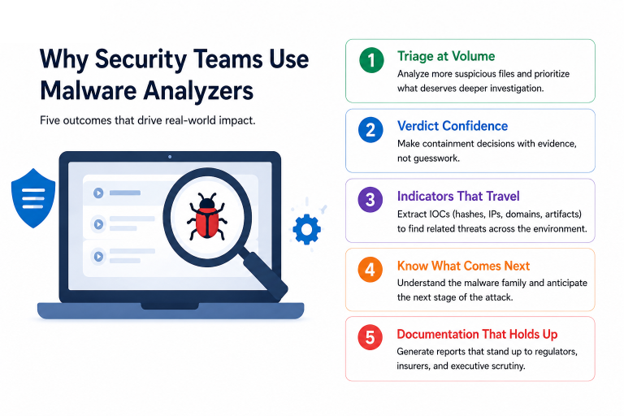
That gap is what a malware analysis tool exists to close. Five outcomes keep it in daily use:
- Triage at volume. Analysts see far more suspicious files than anyone can reverse-engineer by hand. A structured behavioral report in minutes lets the team rank what deserves deeper work and what can be closed.
- Verdict confidence before containment. Isolating an executive’s laptop or pulling a production server offline carries real cost. Observed behavior justifies that call — and just as importantly, justifies standing down on a false positive.
- Indicators that travel. A single run yields hashes, registry modifications, dropped payloads, mutexes, and command-and-control infrastructure. Those indicators are what let a team search the rest of the estate for hosts the original alert never flagged.
- Knowing what comes next. Identifying a sample as a known loader, stealer, or ransomware variant tells the team what typically follows in the kill chain — so they can hunt the second stage before it deploys rather than after.
- Documentation that survives scrutiny. Regulators, insurers, and boards ask what the malware did. A timestamped analysis report answers that in a form that holds up.
Where This Shows Up Day to Day
Four situations account for most analyzer use:
Alert triage. An endpoint alert flags an unknown binary — the analyzer resolves it into a verdict, a family attribution, and specific indicators to search for elsewhere in the environment.
Phishing investigation. A user reports a suspicious link — the URL scanner shows what the page actually serves, whether it impersonates a brand, and where it sends any credentials entered into it.
Threat hunting. Search a corpus by content, indicator, technique, or malware family, save a standing hunt, and get notified when a new sample matches it.
Malware research. Choose the sandbox guest, network mode, and detonation engine, drive a sample interactively, and compare two builds of the same family side by side.
Access matters as much as capability. Online malware analysis removes the burden of building and maintaining isolated infrastructure in-house, which is why a free malware analyzer is often the first tool a resource-constrained team reaches for — and why a two-person security function can run the same behavioral workflow as a well-staffed SOC.
MalwareAnalyzer is built around the evidence problem specifically: every verdict lists each contributing engine’s individual result, including the engines that found nothing, and any sandbox run that finishes incomplete or degraded is labeled as such rather than presented as a clean result.
Scanner vs. Analyzer vs. Sandbox: What’s the Difference?
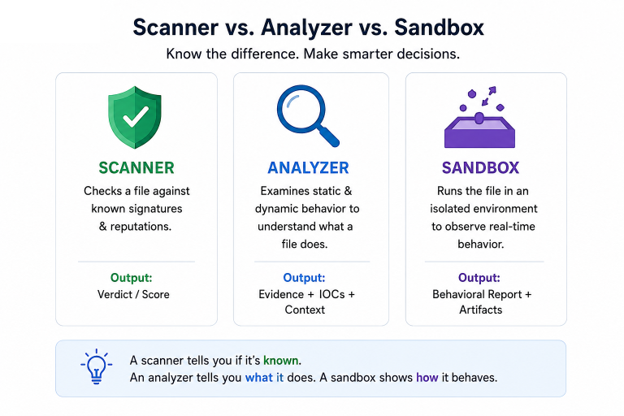
The three terms get used interchangeably, but they answer different questions. A scanner asks whether a file has been seen before. An analyzer asks what the file actually does. A sandbox is the isolated environment where that second question gets answered safely.
| Aspect | Malware Scanner | Malware Analyzer | Malware Sandbox |
| Question answered | Does this match something known to be bad? | What does this file do, and what did it touch? | What happens when this file is allowed to run? |
| Primary method | Signature, hash, and heuristic matching against a threat database | Static inspection combined with observed runtime behavior | Malware detonation inside an instrumented, isolated environment |
| Unknown or zero-day files | Frequently missed — no prior signature exists | Surfaced through behavior rather than prior knowledge | Surfaced, provided the sample executes rather than evading the environment |
| Typical output | A verdict: clean, suspicious, or malicious | Behavioral report, extracted IOCs, family classification | Execution trace, process tree, network callbacks, filesystem and registry changes |
| Where it fits | Prevention layer — endpoint, email, and web gateways | Investigation layer — SOC triage, incident response, threat hunting | Execution engine inside the investigation layer |
| Main limitation | Blind to anything not yet catalogued | Requires an analyst to interpret and act on findings | Evasion-aware malware may stay dormant when it detects instrumentation |
The distinction that actually matters
A scanner and an analyzer are genuine alternatives — two different approaches to the same file. A malware sandbox is not a third alternative. It is a component inside analysis.
Most malware analyzer tools contain a sandbox and use it to perform the execution half of their work. This is why asking whether a platform “has a sandbox” is a weaker question than asking what that sandbox is instrumented to capture, how long it runs a sample before terminating, and whether it defeats the anti-analysis checks malware families routinely use to detect virtualized environments. A sandbox a sample recognizes and sleeps through produces a clean report on a malicious file — the most dangerous output in the entire workflow.
For most teams the answer is not choosing between the three. It is running scanners at the prevention layer to handle known threats cheaply at volume, then routing whatever survives to an analyzer for a behavioral verdict. Within that analyzer, the meaningful technical split is between examining a file at rest and executing it — which is the distinction the next section covers.
Static vs. Dynamic Malware Analysis
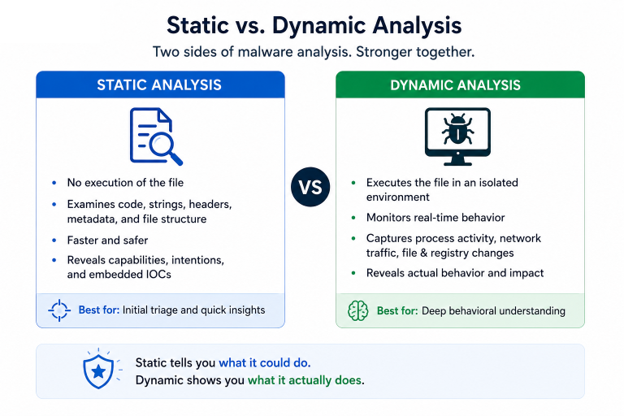
Most malware analysis tools lean on one of two techniques, and the strongest platforms run both.
Static malware analysis examines a file without running it — parsing its structure, extracting strings and imports, checking packers and certificates, and matching it against antivirus engines and YARA rule packs. It’s fast (often under five seconds) and safe, but a well-obfuscated sample can hide its real behavior from a purely static pass.
Dynamic malware analysis — also called sandbox analysis — actually executes the file in an isolated environment and records what it does: the processes it spawns, the registry keys it touches, the network traffic it generates, the files it drops. This is the only way to see behavior that only appears at runtime, such as a payload that decrypts itself in memory or only activates under specific conditions.
| Aspect | Static Analysis | Dynamic Analysis (Sandbox) |
| Speed | Seconds | Minutes (real execution takes time) |
| What it sees | File structure, strings, signatures | Actual runtime behavior, network calls, dropped files |
| Risk of evasion | Higher — obfuscation and packing can hide intent | Lower — behavior is observed directly |
| Best for | Fast triage, bulk scanning | Confirming intent, extracting IOCs, family attribution |
A malware analysis platform that only offers one of these is giving you half the picture. MalwareAnalyzer runs both on every submission: static engines scan the bytes immediately, and any executable file type is queued into a real sandbox for genuine detonation.
What to Look for in Malware Analysis Software
Not all malware analysis tools are built the same way, and the differences matter once you’re relying on a verdict to make a decision. When evaluating malware analysis software or a malware analysis platform, a few things are worth checking:
Does it actually execute files, or only simulate behavior? Some platforms infer behavior from static signals alone and present it as if it were observed — MalwareAnalyzer’s reports explicitly state when a sandbox run is incomplete or degraded, rather than quietly presenting reduced coverage as a clean result.
Can you see the reasoning behind a verdict? A single “malicious” or “clean” label is only as trustworthy as the evidence behind it. Look for tools that list every detection engine’s individual result, including engines that found nothing.
Does it cover the operating systems and file types you actually deal with? Windows and Linux binaries, Office documents, PDFs, Android packages, and URLs all behave differently and need different handling.
Is there a real API, or is the web UI the only way in? Security teams need to pull results into their own tooling — a REST API, threat-intel feeds, and SIEM/SOAR integrations are what make a platform usable at scale rather than one file at a time.
Introducing MalwareAnalyzer: A Free Malware Sandbox From Cyble
MalwareAnalyzer is a public malware analysis and threat intelligence platform built by Cyble, an AI-native cybersecurity company. You submit a file, a URL, or a hash, and it returns a verdict backed by multi-engine static scanning, real sandbox execution, extracted indicators, and a threat graph you can pivot through — and for public submissions, all of it is free with no submission limit.
That “free and unlimited” claim is worth being specific about, because most tools that advertise it quietly cap you somewhere. On MalwareAnalyzer:
- Submitting files and URLs for public analysis has no daily cap and requires no account or API key.
- Dataset lookups (checking an existing hash, URL, or IOC) are limited to 1,000 per day per IP address on the free tier.
- Premium features — private (non-public) analysis, deep URL scans, interactive live-VM sessions, and the AI assistant — use a credit system, and every account starts with a free credit grant.
- Anonymous submissions are public, which is what keeps the shared corpus growing; signed-in users can submit privately instead, and a private sample is never published or shown in the public feeds.
How MalwareAnalyzer’s Sandbox Detonates Files in Real Time
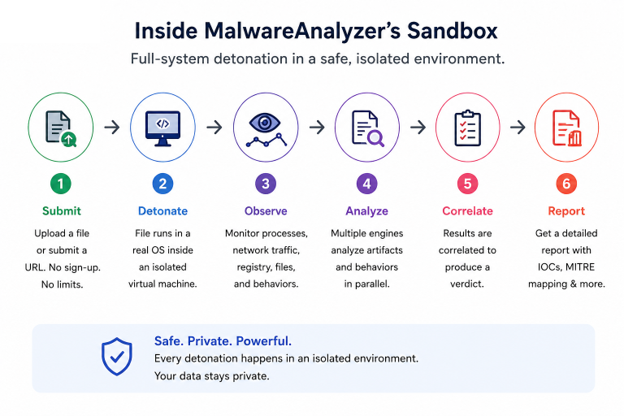
This is the part that separates a real malware sandbox from a scanner that only reads file metadata. When you submit an executable, MalwareAnalyzer queues it into an instrumented full-system sandbox and actually runs it, with controlled network egress so the sample can reach out (and reveal its infrastructure) without causing real harm.
Behind the scenes, the platform runs across multiple sandbox engines depending on the file and guest OS: CAPE for Windows detonation, QEMU/KVM for full-system execution, DRAKVUF for virtualization-based introspection that’s harder for malware to detect, a dedicated Android analysis tier for APKs, and Qiling for lightweight emulation. Office documents and PDFs are opened in real reader applications rather than parsed only — because a malicious macro or embedded exploit often only fires when the actual application processes it.
For samples that need a human touch — a payload waiting for a mouse click, a password prompt, or a decision an automated run can’t make — MalwareAnalyzer also offers an interactive live-VM session, letting an analyst take the keyboard and drive the sample in real time inside the isolated guest.
Every dynamic run captures the full process tree, API activity, dropped files, memory artifacts, and network traffic. If a sandbox run doesn’t complete cleanly, the report says so explicitly — an incomplete run is labeled as one rather than presented as a clean verdict.
Can You Check a Website for Malware, Too?
Yes — MalwareAnalyzer isn’t limited to files. It doubles as a website virus checker: paste a URL and it fetches the page through an egress-locked scanner first (so nothing executes against your own network), then renders it in an isolated browser to capture requests, cookies, scripts, and a screenshot. This is genuinely one of the more overlooked ways to check website security online, since most free URL scanners only check a domain’s reputation against a blocklist rather than actually loading the page and watching what it does.
The same detection engines used for files run over the page content and over anything the page tries to serve. Brand impersonation, homograph domains (lookalike URLs designed to pass a glance), phishing kits, and credential-harvesting forms are flagged with the specific reason each was called out — not just a generic “suspicious” label. For anyone looking for a website to check website security before clicking a reported link, this closes the same evidence gap that file analysis does: you get to see what the page actually does, not just a risk score.
How to Analyze a File or URL With MalwareAnalyzer
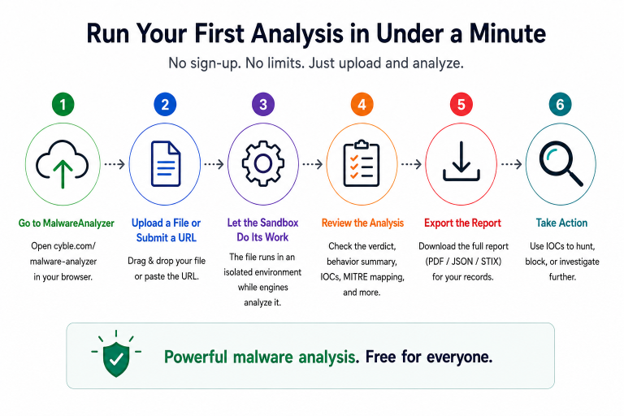
Running an analysis takes four steps:
- Submit. Drop a file, paste a URL, or look up a hash directly on the site. Files are hashed in your browser first, so if a sample is already in the corpus, its existing report returns immediately instead of re-running the whole pipeline.
- Static analysis runs automatically. The full engine roster scans the bytes in seconds while parsers extract strings, imports, certificates, and embedded indicators.
- Detonation, if applicable. Executable file types are queued into a sandbox guest and actually run — the platform waits for a genuine slot rather than degrading to a lighter analysis.
- Pivot and export. Read the fused verdict with every contributing signal, follow the indicators into the threat graph, and export the result as a PDF/Word report, a STIX bundle, or a raw API response.
For teams that want to script this, the same flow is available over a documented REST API — submit a file as base64 in a JSON POST request and get back a task ID and report URL, no API key required for public submissions.
Frequently Asked Questions
Is MalwareAnalyzer really free?
Yes. Submitting files and URLs for public analysis is unlimited and free, including the full report. Lookups against the existing dataset are capped at 1,000 per day per IP, and premium features like private analysis and interactive sessions use a credit system that every account starts with a free grant for.
Does MalwareAnalyzer actually run the file, or just scan it?
Both. Every submission goes through static scanning (antivirus engines, YARA, hash reputation) first, and executable file types are then detonated in a real, instrumented sandbox that records actual process activity, not simulated or inferred behavior.
What’s the difference between static and dynamic malware analysis?
Static analysis examines a file without executing it — fast, but limited against obfuscation. Dynamic analysis (sandboxing) runs the file and records its real behavior, which is the only reliable way to see what a sample does once it’s live.
What’s the difference between a malware scanner, an analyzer, and a sandbox?
A scanner matches a file against known-bad signatures and returns a verdict. An analyzer determines what the file actually does and returns the supporting evidence. A sandbox is the isolated environment where that execution happens — a component inside analysis, not a separate category of tool.
Which operating systems can MalwareAnalyzer detonate on?
Windows and Linux samples run in full-system sandboxes with controlled network egress. Android packages are analyzed statically and detonated when the Android tier is attached. There’s no macOS sandbox, so Mach-O files get static analysis and lightweight emulation only — the report states this plainly rather than presenting it as a full result.
Can I use it to check if a website is safe?
Yes. Paste a URL and it’s fetched through an egress-locked scanner, then rendered in an isolated browser to capture scripts, cookies, requests, and a screenshot, with brand impersonation and credential-harvesting forms flagged by the specific signal that triggered the flag.
Is my submission public?
Anonymous submissions are public, which is what keeps the shared threat corpus useful to everyone. Signing in lets you submit privately — a private sample is never published, indexed, or shown in public feeds, and any URL containing credentials or tokens is automatically redacted and forced private.
Can I integrate MalwareAnalyzer into my own tools?
Yes — there’s a documented REST API with an OpenAPI spec, an MCP server for AI assistants, STIX 2.1 and CSV threat feeds, a TAXII endpoint, and push connectors for common SIEM and SOAR platforms.
Try It Yourself
MalwareAnalyzer is a free malware analyzer, open to anyone at malwareanalyzer.com — submit a file, a URL, or a hash, no account required, and get a verdict backed by real sandbox detonation rather than a single opaque score.
About the Author
[TO COMPLETE] [Author Name] is [Title] at Cyble, specialising in [area]. [One sentence on relevant credentials or research experience.] Connect on LinkedIn: [profile URL].
Template requirement: a named, credentialed byline linked to a verifiable person is one of the strongest E-E-A-T signals on the page. The byline at the top of this article must be filled in to match.
Appendix: Suggested FAQ Schema (JSON-LD)
Hand this to your dev team to add to the page <head> so search engines and AI crawlers can parse the FAQ section directly. Keep it in sync with the FAQ text above if you edit it.
{
“@context”: “https://schema.org”,
“@type”: “FAQPage”,
“mainEntity”: [
{
“@type”: “Question”,
“name”: “Is MalwareAnalyzer really free?”,
“acceptedAnswer”: {
“@type”: “Answer”,
“text”: “Yes. Submitting files and URLs for public analysis is unlimited and free, including the full report. Lookups against the existing dataset are capped at 1,000 per day per IP, and premium features like private analysis and interactive sessions use a credit system that every account starts with a free grant for.”
}
},
{
“@type”: “Question”,
“name”: “Does MalwareAnalyzer actually run the file, or just scan it?”,
“acceptedAnswer”: {
“@type”: “Answer”,
“text”: “Both. Every submission goes through static scanning first, and executable file types are then detonated in a real, instrumented sandbox that records actual process activity, not simulated or inferred behavior.”
}
},
{
“@type”: “Question”,
“name”: “What’s the difference between static and dynamic malware analysis?”,
“acceptedAnswer”: {
“@type”: “Answer”,
“text”: “Static analysis examines a file without executing it. Dynamic analysis (sandboxing) runs the file and records its real behavior, which is the only reliable way to see what a sample does once it’s live.”
}
},
{
“@type”: “Question”,
“name”: “What is the difference between a malware scanner, an analyzer, and a sandbox?”,
“acceptedAnswer”: {
“@type”: “Answer”,
“text”: “A scanner matches a file against known-bad signatures and returns a verdict. An analyzer determines what the file actually does and returns the supporting evidence. A sandbox is the isolated environment where that execution happens, making it a component inside analysis rather than a separate category of tool.”
}
},
{
“@type”: “Question”,
“name”: “Which operating systems can MalwareAnalyzer detonate on?”,
“acceptedAnswer”: {
“@type”: “Answer”,
“text”: “Windows and Linux samples run in full-system sandboxes with controlled network egress. Android packages are detonated when the Android tier is attached. There is no macOS sandbox, so Mach-O files receive static analysis and lightweight emulation only.”
}
},
{
“@type”: “Question”,
“name”: “Can I use MalwareAnalyzer to check if a website is safe?”,
“acceptedAnswer”: {
“@type”: “Answer”,
“text”: “Yes. A submitted URL is fetched through an egress-locked scanner and rendered in an isolated browser to capture scripts, cookies, requests, and a screenshot, with brand impersonation and credential-harvesting forms flagged by the specific signal that triggered them.”
}
},
{
“@type”: “Question”,
“name”: “Is my submission to MalwareAnalyzer public?”,
“acceptedAnswer”: {
“@type”: “Answer”,
“text”: “Anonymous submissions are public. Signing in allows private submissions, which are never published, indexed, or shown in public feeds, and URLs containing credentials or tokens are automatically redacted and forced private.”
}
},
{
“@type”: “Question”,
“name”: “Can I integrate MalwareAnalyzer into my own tools?”,
“acceptedAnswer”: {
“@type”: “Answer”,
“text”: “Yes. MalwareAnalyzer offers a documented REST API with an OpenAPI specification, a Model Context Protocol server for AI assistants, STIX 2.1 and CSV threat feeds, a TAXII endpoint, and push connectors for common SIEM and SOAR platforms.”
}
}
]
}