
In the present digital landscapes, speed and performance are essential rather than just being good to have. Users demand quick replies and smooth interactions no matter if it is a website, a mobile application, an enterprise platform, or a cloud service. Caching Data is one of the most effective means for companies to deliver fast responses and seamless experiences to their customers.
Efficient is the very essence of caching. Rather than going back and forth to a slow or distant source for the same information, systems keep the information near the demand temporarily.
This basic notion plays a crucial part in lessening the effect of infrastructural load, and thus, is a significant player in the digital world regarding performance, reliability and even tolerance for failures.
Cache Data Definition
Before going further, it is vital to get the cache data definition straight. Cache data is the term for the temporary storage of frequently accessed information such that it can be retrieved quickly without going through the original request again.
The information is generally stored in high-speed storage places like memory (RAM), local storage, or edge servers.
When done right, Caching Data brings about a tremendous drop in the waiting time, causing a lull in the network traffic, and improving the system’s overall engagement. It is everywhere—starting from browser and operating systems all the way down to databases, APIs, and cloud platforms.

How Cache Works in Simple Terms?
The workflow of cache is quite simple, and many persons question it. When the very first data request is made by a user or a system, it is sent to the main data source, for example, a database or server.
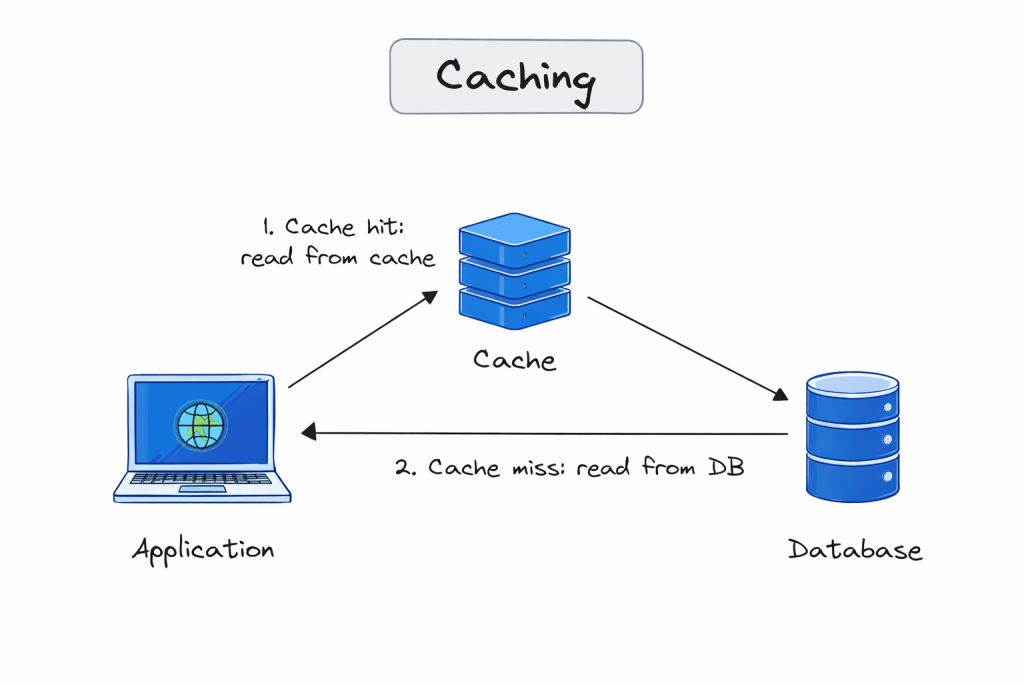
Subsequently, the data that has been requested is cached, which means that a copy of the data is kept. In the case of the same request being made after some time, the system first checks the cache. If the data is present and is valid, then it is instantly served from the cache rather than going to the original source.
This is where Caching Data is powerful, it cuts down on needless operations and delivery pace is increased, but the actual data source remains unchanged.
Importance of Caching Data for Performance
Performance is the most apparent advantage of Caching Data. The content that is Cached takes less time to load as it does not need the repeated querying of the database, nor does it have to rely on a long network route.
This situation is particularly vital for the websites with high traffic, real-time user applications, and systems that process huge amounts of data.
From the viewpoint of infrastructure, caching lightens the burden on backend servers. The number of direct requests is less, so the CPU usage is lower, strain on the database is less and the system is more scalable during peak demand.
Types of Caching You Should Know
There isn’t just one way to implement caching data. Different caching layers serve different purposes:
- Browser caching stores files locally on a user’s device.
- Application caching keeps frequently used data in memory.
- Database caching reduces repeated query execution.
- Content delivery caching stores content closer to users geographically.
Each type improves performance and reliability in different parts of the technology stack.
Caching Data and System Reliability
Beyond speed, caching data also contributes to resilience. When backend systems face delays or temporary outages, cached data can still be served, ensuring some functionality remains.
This method is especially useful in distributed systems and cloud environments where availability is crucial. Even in security-focused platforms, caching helps balance performance with operational continuity.
Security Considerations When Caching Data
Caching Data is a way to make things work faster. You have to do it carefully. You should not store personal information in the cache unless you have good controls in place.
This means you need to think about who can access the information how to keep it secret, with encryption and when the cached information should be removed with cache expiration policies. This helps to prevent information from being seen by people who should not see it which is a big deal when it comes to Caching Data.
When we talk about cybersecurity workflows caching is something that helps make things faster. It does this without keeping information that we do not need. For instance, companies like Cyble use caching methods to make data processing better.
At the time they make sure to follow very strict security and compliance rules to keep everything safe. This is how cybersecurity workflows and caching work together like, in the case of Cyble and its cybersecurity workflows, where caching’s very important.
When Should You Use Caching Data?
You should use caching data when you want to make your website or application run faster. Caching data is really useful because it helps people get the information they need quickly.
You can use caching data in situations. For example caching data is an idea when you have a lot of people visiting your website at the same time. Caching data helps your website handle all these visitors without slowing down. Here are some other times when you should use caching data:
- When your website has a lot of files that take a long time to load caching data can help make them load faster.
- When you are working with data that does not change often caching data is a good way to store this data so it can be accessed quickly.
- When you want to reduce the amount of work your server has to do caching data can help by storing some of the data in a place where it can be accessed easily.
Overall caching data is an idea whenever you want to make your website or application run more efficiently.
Cache Expiration and Updates
One of the most critical factors in the Caching Data process is determining the duration of the validity of cache data. Cache expiration stipulates that the old data will be automatically replaced by a new one. This trade-off between fast access and data accuracy is particularly important for dynamic environments.
Using smart caching strategies, the accuracy of data is maintained through time-based expiration, event-driven updates, or validation checks without sacrificing performance.
Data Caching in Modern Cloud and API Environments
In cloud-native architectures, Caching Data is a necessity. APIs, microservices, and distributed systems make extensive use of caching to remain responsive even at high loads. Latency and infrastructure costs can otherwise rise swiftly.
Besides, caching greatly enhances the customer experience by reducing the response time across different geographies and devices.
Conclusion
In the present-day digital era, the users consider the systems based on speed and reliability. Caching Data is one of the helpers of organizations that meet these expectations while controlling the cost.
It enables the scalability of systems, performance improvement, and the creation of resilience, which are all aspects that apply to different industries.
If you operate a content-heavy website, a SaaS platform, or an enterprise application, caching is no longer a matter of choice, it is a necessity.
FAQs About What Is Caching Data
What is data caching and how does it work?
Data caching is the process of storing copies of data in a temporary storage location (a cache) so that future requests for that data can be served faster. It works by intercepting data requests: if the data is in the cache (a “hit”), it’s delivered instantly; if not (a “miss”), it’s fetched from the primary source and then stored in the cache for next time.
hy is caching data important for application performance?
Caching significantly reduces latency and bandwidth usage. By serving data from memory (RAM) instead of a disk-based database or an external API, applications can achieve sub-millisecond response times and handle higher traffic loads without crashing the backend.
What are the different types of caching?
Common types include:
Browser Caching: Stores website files on a user’s local device.
CDN Caching: Stores content on servers globally to reduce physical distance to users.
Database Caching: Uses tools like Redis or Memcached to store frequent query results.
Application Caching: Stores processed data or objects within the app’s memory.
What is the difference between Redis and Memcached?
While both are in-memory data stores, Redis supports complex data structures (lists, sets, hashes), data persistence, and replication. Memcached is simpler, multithreaded, and designed specifically for high-speed, basic key-value caching.
What are common cache eviction policies?
When a cache is full, it must decide what to delete. Common strategies include:
LRU (Least Recently Used): Removes data that hasn’t been accessed for the longest time.
LFU (Least Frequently Used): Removes data used the fewest number of times.
FIFO (First-In, First-Out): Removes the oldest data regardless of usage.
What is Cache Invalidation?
Cache invalidation is the process of removing or replacing data in the cache when the original source changes. It is often cited as one of the hardest problems in computer science (“There are only two hard things in Computer Science: cache invalidation and naming things”).
What is a Cache Hit vs. a Cache Miss?
Cache Hit: The requested data is found in the cache.
Cache Miss: The data is not in the cache, forcing the system to retrieve it from the slower main memory or database.
What is the Write-Through vs. Write-Back strategy?
Write-Through: Data is written to the cache and the database simultaneously (high consistency).
Write-Back: Data is written to the cache immediately, but only updated in the database after a delay (higher performance, but risk of data loss).
Can caching lead to stale data?
Yes. If the underlying data changes but the cache is not updated or invalidated, users will see stale data. This is why setting an appropriate TTL (Time To Live) is crucial.
How do I clear the cache on my browser or server?
Browser: Usually found in “Privacy and Security” settings or by pressing Ctrl + F5 for a hard refresh.
Server: Depends on the tool (e.g., running FLUSHALL in Redis or clearing the cache directory in a CMS like WordPress).