A dark web browser is purpose-built software that routes traffic through anonymizing networks like Tor or I2P so a user can reach .onion and similar non-indexed services without exposing their real IP address. For security researchers, the right choice depends less on which single tool is “best” and more on which one matches the risk level of the work — and in 2026, that decision has gotten more complicated, not less.
The old advice of “just use Tor Browser” still holds up for casual or low-risk lookups. But the researchers running sustained monitoring against ransomware leak sites, threat actor forums, or credential marketplaces have largely moved toward layered setups — Tails for disposable sessions, Whonix for VM isolation, Qubes for full compartmentalization. If your last read on this topic was a couple of years old, the landscape has shifted enough that it’s worth a fresh look.

Key Takeaways
- Tor Browser is still the default entry point for most researchers, but it’s rarely the only tool in a serious OPSEC stack anymore.
- Tails OS and Whonix have become the de facto standard for anything beyond casual browsing — both isolate the research environment from the host system in ways a browser alone can’t.
- No single browser guarantees anonymity. In 2026, tracking has moved well past IP logging into behavioral fingerprinting and cross-session correlation — tool choice is one layer of a broader operational security practice, not a substitute for one.
- For enterprise CTI teams, manual browsing doesn’t scale. Automated monitoring platforms are the more realistic answer to “how do we watch the dark web” than any individual browser.
What Is a Dark Web Browser and How Is It Different from a Regular Browser?
A dark web browser is software configured to route connections through an anonymizing overlay network — most commonly Tor, sometimes I2P or Freenet — so it can resolve .onion or similar addresses that don’t exist on the regular DNS system. A standard browser like Chrome or Safari simply can’t reach these addresses; there’s no routing path without the overlay network doing the work underneath.
It’s worth separating this from two adjacent terms people often conflate. The deep web is just the much larger category of unindexed content — your bank login, a private Google Doc, a paywalled journal article — none of which requires anything more than a regular browser and the right credentials.
The dark web is the smaller, deliberately concealed slice of that deep web that specifically requires an anonymizing network to access. And a dark web browser isn’t the same thing as a dark web search engine — the browser gets you there; the search engine (a separate category Cyble has covered in its own guide to the top dark web search engines) helps you find what you’re looking for once you’re in.
Best Dark Web Browsers at a Glance
| Browser | Best For | Tor Integration | Platform | Ease of Use | Anonymity Level |
| Tor Browser | Overall daily research use | Native | Windows, macOS, Linux, Android | Easy | High |
| Tails OS | Zero-trace, single-session work | Native (forced) | Live USB (any hardware) | Moderate | Very High |
| Whonix | VM-isolated, high-risk investigations | Native (Gateway VM) | Windows, macOS, Linux (via VM) | Advanced | Very High |
| Mullvad Browser | Anti-fingerprinting without full Tor overhead | Optional (via Mullvad VPN) | Windows, macOS, Linux | Easy | Moderate-High |
| Brave Browser (Tor Mode) | Fast, low-risk recon | Built-in Private Tor window | Windows, macOS, Linux, Android | Easy | Moderate |
| I2P | Decentralized peer-to-peer research | Native (separate network) | Windows, macOS, Linux | Advanced | High |
| Freenet | Anonymous publishing/archival research | None (own network) | Windows, macOS, Linux | Advanced | High |
| Qubes OS | Maximum compartmentalization | Via Whonix VM inside Qubes | Dedicated hardware | Advanced | Very High |
| Onion Browser (iOS) | Mobile field verification | Native | iOS | Easy | Moderate |
| Orbot + Tor Browser (Android) | Mobile dark web access | Native (system-wide proxy) | Android | Moderate | High |
Top 10 Dark Web Browsers for Security Researchers
1. Tor Browser — Best Overall
The Tor Browser is still the standard and for good reason. It is built on a hardened Firefox base, and it is engineered so that at the network level, every user looks as close to identical as possible-a deliberate design choice against fingerprinting that has held up since its launch more than a decade ago in 2008.
The network of Tor moves the traffic through three relays – one guard node, one middle node, and one exit node such that each relay only ever sees its immediate neighbors in the chain and never the complete source-to-destination path. According to the network metrics maintained by the Tor Project, the Tor network is currently running on more than 6,000 volunteer-operated relays all over the world.
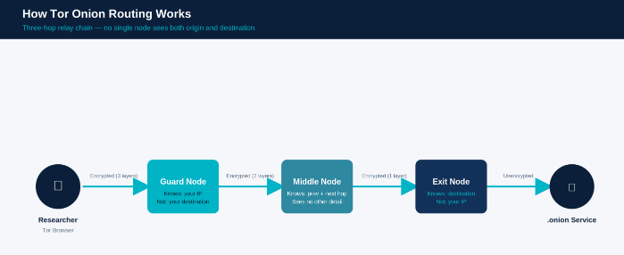
For researchers, this makes Tor Browser useful for getting into investigative forums, watching leak sites, tracking threat actor infrastructure, and studying censorship-resistant communication. The catch is that its safety depends heavily on discipline — JavaScript, media rendering, and file downloads all widen the attack surface, and most serious researchers lock these down using the browser’s built-in “Safest” security setting. Staying current on updates matters too; outdated builds are a known target for fingerprinting and exploit attempts in hostile environments.
2. Tails OS — Best for Zero-Trace Research Sessions
Tails is a live operating system, not only a browser. And that’s important because it boots entirely from a USB drive, runs in RAM, forces all network traffic through Tor by default, and, critically, leaves nothing behind on the host machine once your session ends. Shut it down, and the system reverts to a blank slate.
This makes it most suitable for high-sensitivity, one-time research sessions: verifying a suspicious leak site, a data dump claimed by a threat actor, or anything for which you would not want any trace of the activity to persist on your regular working machine. The compromise is with convenience—Tails is not something you have running in the background of your working day, as with a regular browser.
3. Whonix — Best for VM-Isolated Threat Research
Whonix works on the same problem in a different way: rather than executing all operations on a single machine, it divides the environment into two virtual machines—a Gateway VM, which does all Tor routing, and a Workstation VM, through which the real browsing occurs. The Workstation does not have any direct route to the internet at all; everything goes through the Gateway.
This means that even if the Workstation VM is compromised by a malicious site or browser exploit, there is no way for it to leak the actual IP address of the user since, structurally, it does not have access to it. It is for this reason that architecture has made Whonix one common choice for researchers to sustain higher-risk monitoring of forums or marketplaces where the threat actor exposure risk is elevated.
4. Mullvad Browser — Best for Anti-Fingerprinting Without Full Tor Overhead
Mullvad Browser is a new name but has quickly become known among researchers. It was developed by the team of Mullvad VPN in collaboration with the Tor Project. It applies the techniques of resistance to fingerprints that are present in Tor Browser, but it does not, by default, route traffic through the Tor network. Instead, it is generally used with the VPN service of Mullvad itself.
That makes it a reasonable middle ground: strong protection against browser fingerprinting for research that does not strictly require .onion access, without the latency that comes with routing through multiple Tor relays. It is not a replacement for Tor Browser when actual onion services are the target, but for general anti-tracking research work, it has become a popular alternative.
5. Brave Browser (Tor Mode) — Best for Quick, Low-Risk Dark Web Checks
Brave is a browser based on Chromium with a built-in mode of “Private Window with Tor,” and its main selling point is this: convenience—native Chromium performance, integrated ad and tracker blocking, and the ability to jump between regular and Tor browsing without switching applications entirely.
This ease of use does have a downside for research though. The fingerprint of Chromium in Brave is not as standardized as that of Tor Browser, and the separation of the browsing modes is less strict. Most researchers use it for quick, low-stakes searches, not at all like continuous probing.
6. I2P (Invisible Internet Project) — Best for Decentralized, Peer-to-Peer Anonymous Networks
I2P takes a different approach from Tor. Instead of routing through a relay chain to reach an outside destination, I2P builds its own internal network using garlic routing — and most services it hosts (called eepsites) exist only within I2P itself.
It will be valuable for researchers who are working on decentralized, peer-to-peer, anonymous communication or archives that specifically live on I2P rather than the Tor network, but the setup curve is steeper, and the ecosystem is smaller and more niche compared to Tor.
7. Freenet — Best for Censorship-Resistant Publishing Research
Freenet (recently rebranded in parts of the community as Hyphanet) is more like a distributed, censorship-resistant data store than a browsing tool. Content is published into the network and then replicated across participating nodes, making it hard to take it down or trace it back to a single source.
To researchers, Freenet is mostly applicable when the study specifically deals with anonymous publishing or archival content that circumvents takedown — it’s a narrower use case than general dark web monitoring, but a recurring one in censorship and disinformation research.
8. Qubes OS — Best for Maximum Compartmentalization and Isolation
Qubes OS isn’t a browser at all — it’s a security-focused operating system built on Xen virtualization that runs everything in separate, isolated compartments (“qubes”). A researcher can run a Whonix-based browsing qube completely separated from their email qube, their file storage qube, and so on, so that a compromise in one area can’t spread to another.
This is about as far as compartmentalization goes without dedicated air-gapped hardware, and it’s why Qubes shows up in the workflows of researchers handling genuinely high-risk investigations — think sustained threat actor tracking or handling potentially malicious samples pulled from dark web sources.
9. Onion Browser (iOS) — Best for Mobile Field Research on Apple Devices
Onion Browser is the primary way to reach Tor-based services on iPhones and iPads. Because Apple’s sandboxing restricts background processes and enforces its own WebKit rendering requirements, Onion Browser functions more as a compatibility layer over Tor than a full independent implementation — it can’t fully match desktop-level anonymity guarantees as a result.
Still, it has a place: verifying .onion site availability from the field, doing quick OSINT checks when a desktop isn’t on hand, or confirming a hidden service is still live over a mobile network. Most researchers treat it as a supplementary tool rather than a primary research platform.
10. Orbot + Tor Browser (Android) — Best for Mobile Dark Web Access
On Android, the more reliable combination is Orbot paired with the official Tor Browser for Android. Orbot runs as a system-wide Tor proxy, while Tor Browser for Android handles the actual rendering of .onion pages. Both are maintained directly by the Tor Project and available through the Google Play Store or the Tor Project’s own site.
It’s worth flagging directly: there’s a fair amount of scam and malware-laden software on app stores claiming “dark web access,” and researchers should stick to the official builds rather than third-party alternatives.
LibreWolf: A Note on Proxy-Configured Access
Worth a brief mention outside the core ten — LibreWolf, a privacy-hardened Firefox fork, isn’t a dark web browser on its own, but some researchers configure it with an external SOCKS5 proxy routed through Tor for specific comparative fingerprinting work. It offers no built-in onion routing and no standardized fingerprint across users, so it’s best understood as a flexible research tool for advanced setups rather than a general-purpose recommendation.
How to Choose the Right Dark Web Browser for Your Research Role
There is no single correct answer, but the correct tool tracks pretty closely with the type of research one is performing and how much exposure risk one is willing to carry.
A SOC analyst doing some periodic lookups on a leak site is usually okay with Tor Browser in its Safest security setting. A journalist or OSINT researcher investigating a claim from the field will probably use the Onion Browser or Orbot, according to the device they have.
A CTI analyst working on ongoing monitoring on threat actor forums would be best served with Tails or Whonix, where isolation from the host system reduces the blast radius of a bad outcome. And for pretty much anyone handling truly high-risk investigations—active ransomware infrastructure, live marketplace monitoring—Qubes OS with a Whonix qube is pretty much as close to the ceiling of what’s practical outside dedicated air-gapped hardware.
Enterprise CTI teams face a different sort of tradeoff. Doing manual dark web browsing does not scale well across a team, does not produce clean audit trails, and puts individual researchers at unnecessary risk. This is why cloud-based browsing solutions, along with automated monitoring, have gained traction as the more realistic option for organizations that need consistent, auditable dark web visibility rather than ad hoc individual research.
How to Download and Set Up Tor Browser Safely
For researchers just getting started, the setup matters as much as the tool itself.
- Download only from torproject.org. Third-party mirrors and app store listings claiming to offer Tor Browser are a common vector for malware.
- Verify the download signature. The Tor Project publishes cryptographic signatures for every release — verifying them confirms the file hasn’t been tampered with in transit.
- Set the security level to “Safest” for sensitive work. This disables JavaScript by default and restricts other potentially exploitable features. It’s available under the browser’s shield icon in settings.
- Keep the browser updated. Outdated versions are actively targeted by known fingerprinting and exploit techniques.
- Avoid maximizing the browser window. Screen resolution is one more fingerprinting data point — Tor Browser’s default window size is intentionally uniform across users, and resizing it works against that protection.
- Never log into personal accounts inside a Tor session. Doing so creates a direct link between an otherwise anonymous session and a real identity.
Should You Use a VPN with Tor Browser?
This one gets debated a lot, and the honest answer is: it depends on your threat model.
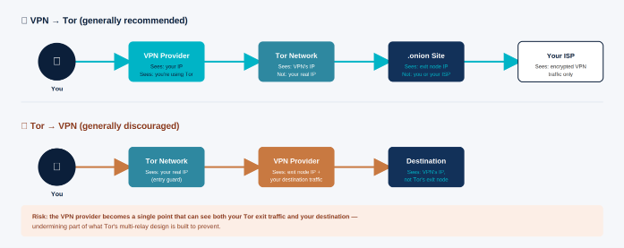
Running a VPN before Tor (VPN → Tor) hides the fact that you’re using Tor at all from your internet provider, at the cost of needing to trust the VPN provider itself with that traffic. Running Tor before a VPN (Tor → VPN) is generally discouraged among security professionals, since it can undercut some of Tor’s core anonymity properties by reintroducing a single point that sees decrypted traffic.
For most researchers, VPN → Tor is a reasonable additional layer, particularly in environments where Tor usage itself might draw unwanted attention. But for research that genuinely demands maximum anonymity, a dedicated setup — a research-only device running Tails or Whonix — tends to offer more reliable protection than layering a VPN on top of a regular Tor Browser installation.
What Security Researchers Must Know
A short, practical checklist that’s worth keeping close:
- Keep every tool — browser, OS, VM software — fully updated.
- Never reuse credentials or personal accounts inside a research session.
- Disable JavaScript and unnecessary browser features by default.
- Use a dedicated research machine or VM, isolated from personal or production systems.
- Avoid downloading files from .onion sites unless absolutely necessary, and only ever open them in an isolated environment.
- Pair Tor with a VPN thoughtfully, based on your actual threat model — not by default.
- Assume every session could be logged somewhere; don’t treat any tool as a guarantee of invisibility.
Tracking methods in 2026 go well beyond IP logging. Behavioral fingerprinting, machine-learning-based profiling, and cross-session correlation are all active techniques, and law enforcement agencies have documented cases of deanonymization through browser exploits delivered via compromised .onion sites. None of the tools above eliminate that risk entirely — they reduce it, provided they’re used with discipline.
Is Using a Dark Web Browser Legal?
Yes — using a browser like Tor to access the dark web is legal in most jurisdictions, including the United States, the United Kingdom, the European Union, and Australia. The Tor Project itself is a registered U.S. nonprofit, and its software is used by journalists, activists, law enforcement, and security researchers as a matter of routine.
What can cross into illegal territory is the activity conducted on the dark web — not the act of accessing it with a privacy-focused browser. Researchers should still be aware that legal frameworks vary by country and evolve over time, and this article isn’t a substitute for legal advice specific to a given jurisdiction or organization.
How Cyble Enhances Dark Web Research Beyond the Browser
Browsers take a researcher to the dark web they don’t fix the issue of watching it all the time, at scale, across a growing number of forums, leak sites, and marketplaces. That’s a fundamentally different problem, and it’s the one Cyble’s platform is built around.
Cyble threat intelligence research reveals that it had monitored over 6,000 data breach incidents in 2025 alone — a level of activity that is truly hard for any team using manual browsing to keep up with.
Cyble automates that visibility by continuously indexing hacker forums, ransomware leak sites, and credential marketplaces so that security teams can get early warning without individual researchers having to carry the OPSEC risk of manual navigation session after session.
That sits alongside Cyble’s broader platform — Attack Surface Management for visibility into external exposures, and Vulnerability Intelligence for prioritizing what needs fixing first. For individuals who want a quick check on their personal exposure, AmIBreached provides an easy way to see if the credentials tied to an email address have ever appeared in a known breach.
Cyble works with security teams who need dark web visibility that scales past what any single researcher, or single browser, can realistically cover alone — as a threat intelligence provider recognized by Gartner would.
To see how Cyble’s Gen 3 threat intelligence platforms supports dark web monitoring and broader threat visibility, book a personalized demo today.
Conclusion
The primary consideration for choosing the right dark web browser in 2026 is to select a tool that aligns with the researcher’s threat model and operational requirements, rather than trying to identify a single “best” option. The Tor Browser continues to be the most used browser for most environments, but more advanced environments have begun to use Tails, Whonix, and Qubes OS for better isolation and reduced exposure.
The requirement is the same across all platforms, strong operational security, up-to-date software, and safe research practices. For organizations needing continuous visibility into dark web activity, secure browsing can be combined with automated threat intelligence and monitoring. That pairing is more scalable and resilient than manual investigation alone.
Frequently Asked Questions About Dark Web Browsers
What is the best dark web browser for security researchers in 2026?
Tor Browser remains the best overall choice for most security researchers, routing traffic through more than 6,000 global relays while standardizing fingerprints across users. For work requiring stronger isolation, Tails OS and Whonix add OS-level separation. Enterprise CTI teams often pair Tor access with automated monitoring platforms for auditable, scalable coverage.
Is using a dark web browser legal?
Yes, in most countries including the U.S., U.K., EU, and Australia. The Tor Project is a registered U.S. nonprofit, and its browser is widely used by journalists, researchers, and law enforcement. It’s the activity conducted on the dark web that can be illegal — not the act of accessing it with a privacy browser.
What is the difference between Tor, Tails, and Whonix?
Tor Browser is a hardened browser routing traffic through three encrypted relays. Tails is a live operating system run from a USB drive that forces all traffic through Tor and leaves no trace after shutdown. Whonix splits browsing and networking into two separate virtual machines, making IP leaks structurally difficult even if the browser itself is compromised.
Should I use a VPN with Tor Browser?
It depends on your threat model. VPN → Tor hides Tor usage from your internet provider but requires trusting the VPN. Tor → VPN is generally discouraged, as it can weaken some of Tor’s anonymity properties. Most researchers find VPN → Tor a reasonable additional layer, though a dedicated Tails or Whonix setup offers stronger protection for high-stakes work.
Can dark web browsers be traced?
No tool guarantees complete untraceability. Modern tracking extends beyond IP addresses into behavioral fingerprinting, JavaScript-based deanonymization, and cross-session correlation. Tor Browser significantly reduces these risks through fingerprint standardization, but operational discipline — no personal logins, JavaScript disabled, VM isolation — remains essential.
What is the safest dark web browser for beginners?
Tor Browser is the easiest entry point, requiring no configuration and shipping with JavaScript restricted by default in Safest mode. Tails OS is a reasonable next step for those wanting stronger guarantees, since it resets to a clean state after every session.
Disclaimer: Cyble does not endorse, encourage, or facilitate illegal activity of any kind. The information provided in this article is intended solely for cybersecurity research, threat intelligence, defensive security, and educational purposes. Readers are responsible for ensuring that any tools, techniques, or information discussed are used only in compliance with applicable laws, regulations, and organizational policies.