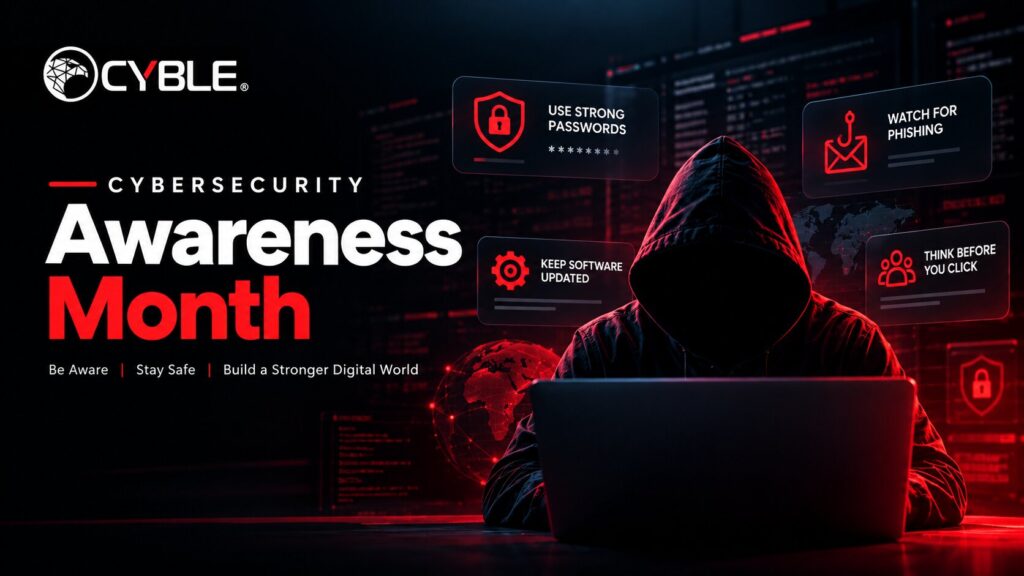
Cybersecurity Awareness Month 2026 is here, and the advice sounds familiar. The National Cybersecurity Alliance’s theme this year is Don’t Make It Easy for Them, built around four habits: use strong passwords and a password manager, turn on multifactor authentication, recognize and report scams, and keep your software updated.
Good advice. But you’ve heard it before, and so have your employees.
What almost nobody talks about during Cybersecurity Awareness Month is what happens on the other side when one of those habits slips. Where does the reused password go? Who buys the login from an account without MFA? How fast does an unpatched server get found?
That’s the part we watch every day at Cyble Research and Intelligence Labs (CRIL). So instead of another list of cybersecurity awareness tips, here’s what cybercriminals actually do with each habit you skip, and what security teams can check right now.
Cybersecurity Awareness Month 2026 in Practice: What Happens When Each Habit Slips
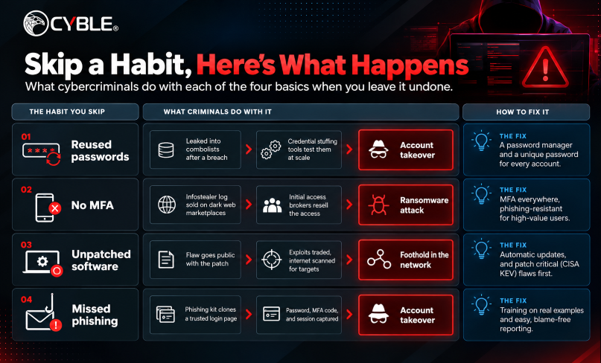
Habit 1: Reused Passwords Turn into Combolists
Reused passwords end up in combolists, huge files of email and password pairs that attackers feed into credential stuffing tools.
Every data breach adds to the pile. Leaked credentials from one site get cleaned up, merged with older leaks, and passed around underground forums and Telegram channels. Some combolists are sold. Plenty are given away for free, because the value isn’t in any single list. It’s in volume.
Then automation takes over. Credential stuffing tools try those pairs against login pages at scale: email portals, VPNs, SaaS apps, customer accounts. Nobody needs to crack anything. They just need one person who used the same password for a shopping site and their work account.
That’s why “use a strong password” is only half the advice. A strong password that’s reused is still a stolen password the moment any one site leaks it.
What actually helps:
- A password manager, so every account gets its own password and nobody has to remember them
- Blocking passwords already known to be breached at sign-up and reset
- Watching for stolen credentials on the dark web tied to your company’s email domain, and forcing resets when they show up
Are your employees’ passwords already in criminal hands? Book a personalized Cyble demo to find out.
Habit 2: No MFA Means Your Login Is Up for Sale
Without MFA, an infostealer log is ready-made access. Attackers buy the log, log in, and in many cases resell that access to ransomware groups.
Infostealers are malware built to grab everything saved in a browser: passwords, autofill data, and session cookies. They usually arrive through cracked software, fake downloads, or malicious ads, often on a personal or shared device that also has work accounts saved on it.
Each infected machine becomes a “log” that gets uploaded and sold on dark web marketplaces. Buyers can search logs by domain, so finding your company’s VPN or email login inside one takes seconds. Initial access brokers then package that access and sell it on. That handoff is a big part of how ransomware attacks start, which makes ransomware prevention a login problem as much as a malware problem.
Here’s the part people miss. MFA blocks a stolen password, but a stolen session cookie can let an attacker skip the login step entirely, because the session is already authenticated. MFA is essential. It just isn’t the finish line.
What actually helps:
- MFA on every account, starting with email, VPN, remote access, and admin accounts
- Phishing-resistant MFA, like passkeys or hardware security keys, for high-value users
- Revoking active sessions, not just resetting passwords, when an employee’s device shows up in a stealer log
- Keeping work logins off personal browsers where possible
Habit 3: Unpatched Software Gets Found Fast
Once a vulnerability is public, attackers start scanning for systems that haven’t patched it. Exploit code and discussion about the flaw often circulate on forums and code-sharing sites soon after.
Think of a patch release as a map. It tells attackers exactly what was broken and which versions are exposed. Proof-of-concept code frequently appears publicly, and threat actors trade working exploits and target lists in underground communities. Then they scan the internet for anything still running the vulnerable version.
Internet-facing systems get hit first: VPN appliances, firewalls, file transfer tools, remote access software, and web servers. These are exactly the systems that give an attacker a foothold, so one old patch on one of them can matter more than a hundred missing updates on internal laptops.
Cyble’s weekly vulnerability research regularly flags cases where threat actors are discussing or actively attempting to exploit specific flaws. That chatter is often the clearest signal of what to patch first.
What actually helps:
- Turning on automatic updates for browsers, operating systems, and apps wherever you can
- Prioritizing flaws listed in CISA’s Known Exploited Vulnerabilities catalog
- Keeping an up-to-date inventory of internet-facing assets, because you can’t patch what you don’t know you have
- Treating threat actor chatter about a flaw as a reason to move it up the queue
Habit 4: Phishing Is Cheaper to Run Than Ever
Phishing kits and phishing-as-a-service platforms let almost anyone launch a convincing impersonation campaign without writing a line of code.
A phishing kit is a ready-made package: a cloned login page for a well-known brand, scripts that capture whatever the victim types, and sometimes templates for the lure itself. Phishing-as-a-service goes further, offering hosting, lookalike domains, and dashboards on a subscription, much like any other software product.
Some kits now sit between the victim and the real site, passing the login through in real time. That lets them capture the password, the MFA code, and the session cookie together. It’s one of the main cybercriminal tactics behind account takeovers that happen even when MFA is switched on.
And it isn’t only email anymore. Social engineering attacks now arrive by text message, QR code, collaboration apps, and phone calls to the IT help desk asking for a password or MFA reset. The pretext changes. The goal stays the same: get someone to hand over access.
What actually helps:
- Phishing awareness training built on real examples, not a once-a-year slideshow
- A simple, blame-free way to report suspicious messages, and a fast response when people do
- Help desk rules that verify identity before any password or MFA reset
- Monitoring for lookalike domains and fake profiles impersonating your brand, and getting them taken down quickly
Cybersecurity Awareness Month Checklist: Is Your Organization Already Exposed?
The only way to know is to look outside your network, in the places attackers actually trade credentials, logs, and access.
Most Cybersecurity Awareness Month advice is about building better cybersecurity habits going forward. That matters. But if an employee’s password leaked two years ago, or a laptop was infected last month, the damage may already be for sale. Training won’t find it.
That’s what makes Cybersecurity Awareness Month for security teams different from the version aimed at everyone else. Alongside employee cybersecurity awareness, run a quick exposure check:
- Credentials: Are employee emails and passwords from your domain showing up in combolists or breach dumps?
- Stealer logs: Do any infected devices hold saved logins or session cookies for your systems?
- Impersonation: Are there lookalike domains, fake login pages, or fake social profiles using your brand?
- Exposed assets: Are internet-facing systems running software with known, exploited vulnerabilities?
- Chatter: Is your company, sector, or supply chain being discussed on underground forums?
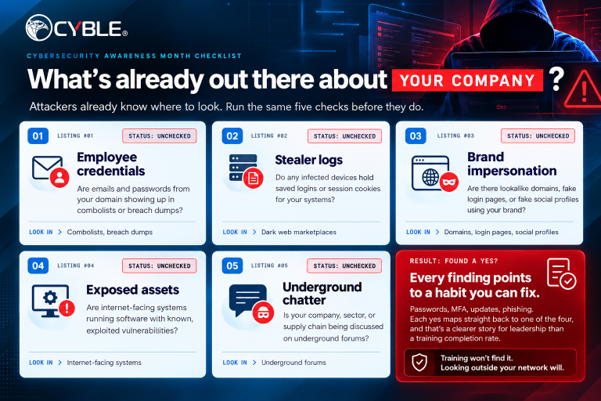
Each finding maps straight back to one of the four habits above. That’s a far more convincing story for leadership than a training completion rate, and it turns cybersecurity best practices into a list of specific fixes.
How Cyble Helps You See What Attackers See
This outside-in view is what Cyble is built for. Cyble Vision monitors deep and dark web forums, marketplaces, and paste sites and maps what it finds against your organization, so leaked credentials or stealer logs tied to your domain show up as specific alerts. Cyble Odin scans the internet for exposed assets before an attacker finds them. Cyble’s dark web monitoring and takedown services track impersonating domains and fake profiles and support fast removal.
There’s a bonus for your October sessions, too. Showing employees real exposure makes online security habits feel a lot less abstract than another slide deck.
You don’t have to guess where you stand.
Want to know if your company’s data is on the dark web? Book a personalized Cyble demo NOW.
Don’t Make It Easy for Them
The point of this year’s theme is simple: make every one of these cyber threats cost attackers more time and effort. Fix the four habits. Then check what’s already out there. You need both.
Cybersecurity Awareness Month 2026 FAQ
What is the Cybersecurity Awareness Month 2026 theme?
There are two. CISA’s theme is “Securing the Next 250,” tied to the 250th anniversary of the United States and focused on a secure digital future for the country’s next era. The National Cybersecurity Alliance’s theme is “Don’t Make It Easy for Them,” which centers on four everyday habits.
When is Cybersecurity Awareness Month?
Every October. It launched in 2004 and is led by the National Cybersecurity Alliance and CISA.
What are the four core habits?
Use strong passwords and a password manager, turn on multifactor authentication, recognize and report scams, and update your software.
How do stolen credentials end up on the dark web?
Through data breaches that get compiled into combolists, and through infostealer malware that harvests saved passwords and session cookies from infected devices. Both are traded and sold on underground forums and marketplaces.
Does MFA stop all account takeovers?
No. It blocks most attacks that rely on a stolen password, but stolen session cookies and real-time phishing kits can get around some MFA methods. Phishing-resistant options like passkeys and hardware security keys close much of that gap.
What should security teams do during Cybersecurity Awareness Month?
Pair employee training with an outside-in exposure check: leaked credentials, stealer logs, lookalike domains, and internet-facing systems with known exploited vulnerabilities.
Quick Revision: Cybersecurity Awareness Month 2026 in Four Points
A reused password ends up in a combolist and gets tested on other login pages.
An account without MFA can be sold as ready-made access once an infostealer grabs the login.
An unpatched server becomes a target as soon as its flaw goes public.
Phishing takes far less effort than it used to, because ready-made phishing kits do most of the work.