

Most people just use Google with basic keyword searches, but in reality, its search engine can do a lot more, even if nobody explains it properly. With advanced search operators, “Google Dorks” helps users locate specific documents files, web pages, and other publicly indexed information in a more precise way. Nowadays, cybersecurity people, investigators OSINT folks, researchers and journalists all tend to rely on Google Dorking for investigations, plus security assessments.
Its importance keeps climbing, mostly because organizations are dealing with bigger and bigger exposure risks tied to online data. As per report, 34% of organizations say data leaks connected to generative AI are their main cybersecurity worry, while 29% focus on adversaries that are getting more and more capable.
And there’s more, recent findings even showed attackers could abuse the “trusted” connection between Gmail and Google Drive to move around malicious files. So yeah, publicly accessible information and platforms people treat as safe, can still turn into real security problems.
In this article, you will figure out what Google Dorks is, how Google Dorking works, which common search operators to use, practical use cases, the legal side of things, and good habits for preventing websites from leaking data they never meant to expose.
Key Takeaways
- Google Dorks kind of relies on those advanced Google search operators, to dig up very particular publicly indexed information faster than a normal search would.
- It’s used a lot by people in cybersecurity, researchers, journalists, and OSINT investigators for all sorts of fact finding, plus security checks.
- Things like site:, filetype:, intitle:, and inurl: make it easier to pinch down the results with real accuracy, instead of getting a noisy pile of pages.
- Using Google Dorking is generally legal when it’s focused on info that’s already public, but going further into exploiting exposed data, or trying to get unauthorized access, that is illegal and it’s also ethically wrong.
- In the real world, organizations can use these queries to spot accidentally exposed files, folders, and other sensitive material before cybercriminals even notice.
- To lower the chance of that kind of exposure, businesses should protect sensitive files, turn off directory listing, keep an eye on what’s being indexed, and run routine security audits.
What is Google Dorks?
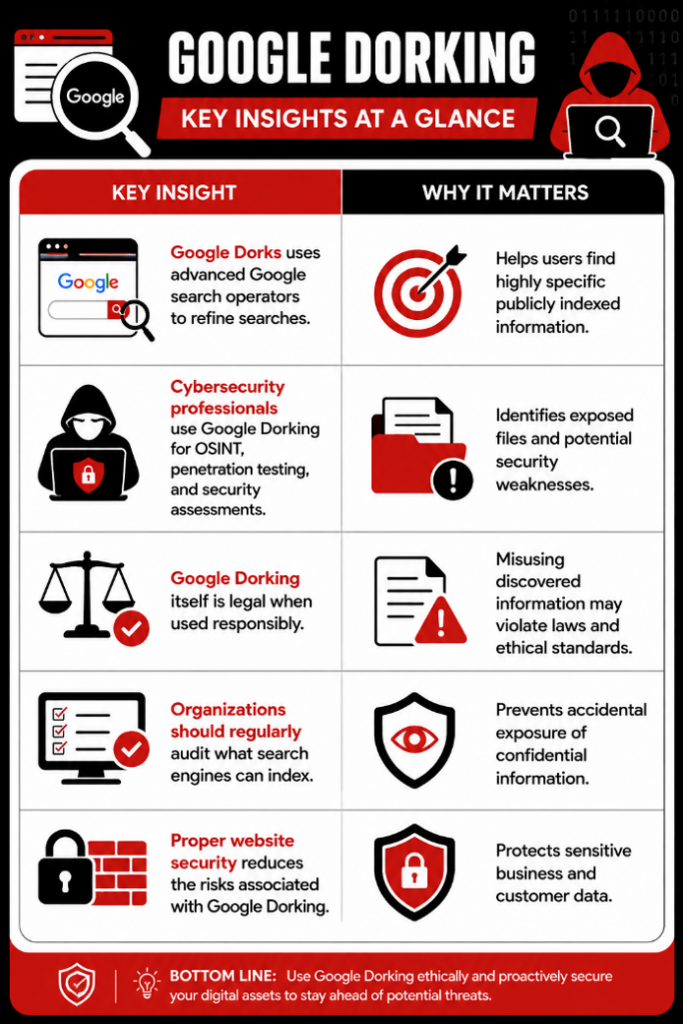
Google Dorks refers to the practice of using Google’s advanced search operators to discover specific information that standard searches often overlook. Instead of relying on general keywords, users combine search operators with targeted terms to locate publicly indexed content with much greater precision.
Although the name may sound technical, Google Dorks simply uses features already built into Google’s search engine. These advanced operators filter search results based on file types, page titles, website domains, URLs, and other characteristics.
Originally introduced for security research, Google Dorks quickly became a valuable technique for many different professionals, including:
- Cybersecurity analysts
- Ethical hackers
- Penetration testers
- OSINT investigators
- Journalists
- Academic researchers
- Digital forensic investigators
- IT administrators
Rather than browsing through hundreds of search results, users can retrieve exactly the type of information they need with carefully constructed queries.
For example, instead of searching for:
Cybersecurity policy PDF
an advanced search could use:
filetype:pdf cybersecurity policy
This instructs Google to display only PDF documents related to cybersecurity policies, making research significantly faster.
Google Dorks Explained in Brief
Why Do People Use Google Dorks?
The primary purpose of Google Dorks is efficiency. Advanced search operators allow users to filter Google’s massive index and retrieve highly relevant information without manually sorting through unrelated results.
Some common legitimate use cases include:
| Use Case | Example |
| Academic research | Finding government reports, whitepapers, and technical documentation |
| Cybersecurity assessments | Identifying publicly exposed directories and configuration files |
| Open Source Intelligence (OSINT) | Gathering publicly available information during investigations |
| Digital journalism | Locating archived documents and official publications |
| IT administration | Verifying whether confidential resources are unintentionally indexed |
Because search engines continuously crawl websites, organizations sometimes unknowingly expose documents that were never intended for public access. Security professionals use Google Dorks to identify these exposures before malicious actors do.
How Does Google Dorking Work?
To understand how Google Dorking works, it is helpful to first understand Google’s indexing process.
Google constantly scans billions of websites across the internet. During this process, it stores information about webpages, documents, images, and other publicly accessible content in its search index.
When someone performs a search, Google retrieves results from this index rather than searching the live web in real time.
Google Dorks refines this process by combining advanced search operators with keywords. Instead of searching broadly, these operators instruct Google to display only results that match very specific conditions.
For example:
- Search only one website
- Search only PDF files
- Search for pages containing a keyword in the title
- Search URLs containing specific words
- Search cached versions of deleted pages
Because of this precision, Google Dorking is often considered one of the most effective Open Source Intelligence (OSINT) techniques available.
For example:
site:gov filetype:pdf cybersecurity framework
This query searches only government websites and returns PDF documents related to cybersecurity frameworks.
Another example:
intitle:”index of” backup
This query looks for publicly indexed directory listings containing backup files.
While these results may reveal useful public information, they can also expose sensitive resources if websites are poorly configured.
It is important to remember that Google Dorks does not hack or bypass security controls. It simply searches content that Google’s crawlers have already indexed. If confidential information appears in search results, it usually indicates that the website owner unintentionally made it publicly accessible.
This is one reason why organizations should regularly monitor what information search engines can access. Routine security assessments, proper access controls, and search engine indexing policies can significantly reduce unnecessary exposure.
In the next section, we’ll explore the most useful Google Dorking commands, explain how each search operator works, and share practical examples you can use for research and cybersecurity investigations.
Essential Google Dorking Commands
Learning a few Google search operators can significantly improve your ability to find relevant information. Below are some of the most widely used Google Dorking commands.
| Google Dork Operator | Purpose | Example |
| site: | Search within a specific website | site:example.com cybersecurity |
| filetype: | Find specific file formats | filetype:pdf incident response plan |
| intitle: | Search keywords in page titles | intitle:”index of” |
| inurl: | Search keywords in URLs | inurl:admin login |
| cache: | View Google’s cached version of a page | cache:example.com |
| ext: | Search by file extension | ext:xls budget |
| allintext: | Find pages containing specific phrases | allintext:”confidential report” |
These operators can be combined to narrow search results even further.
For example:
site:gov filetype:pdf ransomware
returns only PDF documents related to ransomware from government websites.
Likewise,
site:edu filetype:ppt cybersecurity
finds cybersecurity presentations hosted by educational institutions.
Popular Google Dorks Examples
Below are some commonly used Google Dorks that demonstrate how advanced search operators work. These examples are intended for research, learning, and defensive security assessments.
| Objective | Example Query |
| Find open directories | intitle:”index of” |
| Search login pages | inurl:login OR inurl:admin |
| Locate PDF documents | filetype:pdf cybersecurity |
| Find backup files | ext:bak OR ext:backup |
| Search configuration files | ext:xml OR ext:conf |
| Find SQL database files | filetype:sql |
| Locate error pages | intitle:”error” |
| Search cached pages | cache:website.com |
These examples illustrate how search operators refine publicly indexed content. They should never be used to access information without authorization.
Practical Uses of Google Dorks
Finding Public Documents: Government agencies, universities, and organizations often publish reports, policies, research papers, and compliance documents online.
For example:
filetype:pdf site:gov cyber security guidelines
This query returns government cybersecurity guidance in PDF format, making research much faster.
Conducting OSINT Investigations: Open Source Intelligence (OSINT) investigators frequently rely on Google Dorks to locate publicly available information related to domains, organizations, infrastructure, and online assets.
Rather than manually browsing websites, investigators can quickly identify reports, technical documents, archived content, and publicly accessible resources.
Identifying Security Misconfigurations: Security professionals often use Google Dorks during vulnerability assessments to identify unintentionally exposed files or directories.
For example:
intitle:”index of” backup
may reveal publicly accessible backup folders if a server has been misconfigured.
Similarly,
filetype:log
can sometimes identify log files that should never be publicly available.
Finding these exposures enables organizations to secure them before attackers discover them.
Searching for Specific Usernames: Another common use involves searching for publicly indexed usernames.
For example:
“username” site:example.com
can help researchers locate publicly available references to a particular user across a website.
This technique is widely used during digital investigations and brand monitoring.
Is Google Dorking Legal?
One of the biggest misconceptions surrounding Google Dorks is that using advanced search operators is illegal. The reality is more nuanced.
Using Google search operators to locate publicly indexed information is generally legal because the information has already been made accessible through search engines.
However, attempting to access restricted systems, exploit vulnerabilities, download confidential files without authorization, or misuse discovered information can violate privacy laws, cybersecurity regulations, and organizational policies.
In other words, the legality depends on how the information is used, not on the search operators themselves.
Cybersecurity professionals follow responsible disclosure practices whenever they discover exposed information.
Ethical Considerations
Like any cybersecurity technique, Google Dorking should be used responsibly.
If your searches reveal sensitive files or exposed systems, avoid downloading, modifying, or sharing the information.
Instead:
- Notify the website owner.
- Follow responsible disclosure practices.
- Respect applicable privacy and cybersecurity laws.
- Use the findings only for authorized security assessments.
Responsible use helps improve cybersecurity while protecting individuals and organizations from unnecessary risk.
Google Dorking Myths vs Reality

How to Protect Your Website from Google Dorking
Organizations can reduce the risk of exposing sensitive information by following cybersecurity best practices.
- Limit Search Engine Indexing: Use robots.txt and meta noindex tags where appropriate to prevent search engines from indexing administrative or confidential resources.
- Disable Directory Listing: Directory listing can expose internal file structures and backup folders. Disable it on production servers unless there is a legitimate business requirement.
- Secure Administrative Portals: Avoid predictable URLs such as /admin whenever possible and protect administrator portals with strong authentication and multi-factor authentication (MFA).
- Store Sensitive Files Securely: Confidential documents, database backups, API keys, configuration files, and internal reports should never be stored in publicly accessible directories.
- Conduct Regular Security Audits: Periodic penetration testing and vulnerability assessments help identify exposed assets before cybercriminals discover them.
- Monitor Search Engine Results: Organizations should periodically search their own domains using Google Dorks to identify accidentally indexed content.
This proactive approach allows security teams to remove exposed files before they become a security incident.
Why Google Dorks Matters in Modern Cybersecurity
As organizations increasingly adopt cloud services, AI platforms, and digital collaboration tools, publicly exposed information has become one of the easiest entry points for attackers.
The shift in cybersecurity priorities reflects this growing concern.
PwC’s 2026 Global Digital Trust Insights survey found that 34% of CEOs now consider data leaks involving generative AI their biggest cybersecurity concern, while 29% cite increasingly advanced adversarial capabilities as a major risk. These findings highlight that protecting sensitive information is no longer just about preventing cyberattacks but also about managing what becomes publicly accessible.
Recent research into Gmail and Google Drive further demonstrates the importance of visibility. Security researchers showed how attackers could abuse trusted cloud services to deliver malware that appeared legitimate because files carried Gmail’s trusted scanning label. With billions of users relying on these services, even small configuration weaknesses can have widespread consequences.
Understanding Google Dorks helps organizations view their online presence from an attacker’s perspective and identify exposed assets before they are exploited.
Conclusion
Google Dorks is one of the most effective ways to perform precise online searches and understand how information is indexed across the internet. When used responsibly, it enables researchers, cybersecurity professionals, journalists, and OSINT investigators to locate publicly available information quickly and efficiently.
At the same time, organizations should recognize that if search engines can index sensitive information, attackers can find it too. Regular security audits, proper access controls, secure server configurations, and continuous monitoring are essential for reducing unnecessary exposure.
As cyber threats continue to evolve, understanding Google Dorks is no longer just a technical skill. It is an important part of improving cybersecurity awareness and protecting digital assets.
FAQs on Google Dorks
What is Google Dorks?
Google Dorks is a technique that uses advanced Google search operators to locate specific publicly indexed information more efficiently than standard keyword searches.
How do Google Dorking commands work?
Google Dorking works by combining search operators such as site:, filetype:, and intitle: with keywords to refine Google’s search results and locate highly specific information.
Is Google Dorking illegal?
No. Using Google Dorks to search publicly available information is generally legal. However, accessing confidential data without authorization or exploiting vulnerabilities is illegal and unethical.
What are some common Google Dorking username search techniques?
You can use “username” site:example.com to find usernames on a specific site or inurl:profile “username” to locate profiles across the web. These tricks help in OSINT investigations and research.
How can I use Google advanced search safely?
To use Google advanced search safely, stick to ethical searches, avoid accessing private data, and respect website terms of service. Learning proper Google Dorks techniques can improve research without legal risks.
what can google dorks be used for?
Google dorks are advanced search queries used to find specific information on the internet, often revealing hidden or sensitive data like exposed databases, vulnerable websites, or misconfigured systems. They can be used for both legitimate security research and malicious activities, making it important to use them responsibly.
how google dorks works?
Google Dorks is commonly used by cybersecurity professionals, penetration testers, OSINT investigators, researchers, journalists, IT administrators, and digital forensic experts.
what is google dorks for personal information?
Google dorks for personal information refer to advanced search queries used to find sensitive or private data, such as email addresses, phone numbers, or personal documents, that may be exposed online unintentionally. These dorks can reveal information from misconfigured websites or poorly secured databases.
What are common Google Dork examples?
Search queries like filetype:pdf site:gov confidential, intitle:”index of” password, or inurl:login admin.How can organizations protect themselves from Google Dorking?
Organizations should disable directory listing, secure administrative portals, avoid storing confidential files in public directories, apply noindex tags where appropriate, perform regular security assessments, and monitor what search engines have indexed.
Can Google Dorks be used for OSINT?
Yes. Google Dorks is widely used during Open-Source Intelligence (OSINT) investigations to locate publicly available documents, infrastructure details, research papers, archived pages, and other information useful for cybersecurity analysis.
Source:
WEF Global Cybersecurity Outlook 2026 pdf
Significant Threat’—Billions Of Gmail Users At Risk From Google Security Gaffe